Business Process Automation Case Study: How AI Can Fix a Broken Customer Onboarding Workflow
Most companies do not really have a customer onboarding problem. They have a handoff problem.
Sales closes the deal. Operations needs the details. Finance needs billing information. Someone needs the signed documents. Another person needs to create the account. A manager may need to approve something. The customer is waiting through all of it.
Every individual step can look reasonable. Put those steps together, though, and the process often becomes a chain of inboxes, spreadsheets, copy-and-paste work, reminders and status checks.
That is exactly the kind of process where business process automation can make a meaningful difference.
This case study walks through a realistic B2B customer onboarding workflow and shows how AI, APIs, document automation, workflow rules and human approvals can work together.
The Starting Point: A Process That Works, but Only Because People Keep Pushing It Forward
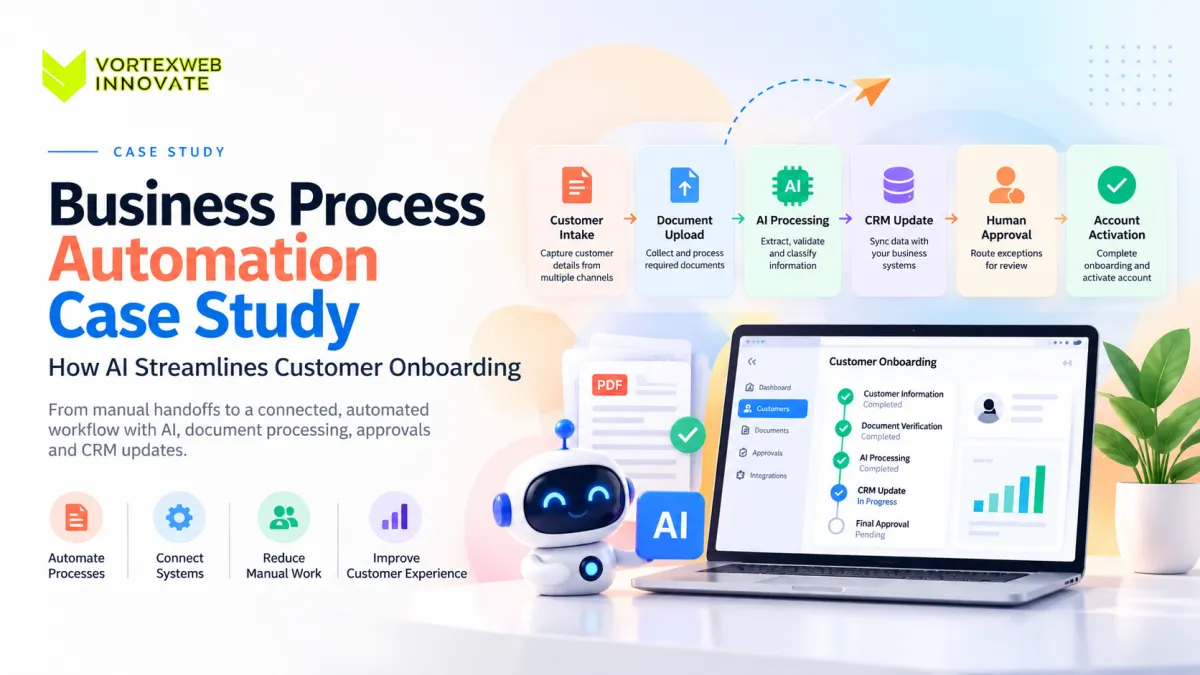
Imagine a B2B company where a new customer is handed from sales to operations after the contract is signed. The sales rep sends an email with the customer details. Operations creates the onboarding record. The customer is asked for several documents. Someone checks those files manually. Details are copied into the CRM. Finance receives another message. A manager approves the account. Another employee creates access in an internal system. The customer then receives a welcome email.
Technically, the process works. But it works because employees continuously move information from one place to another.
That is expensive in a way that is easy to miss. The cost is not just data entry. It is interruption: opening an email, checking another system, copying a value, asking a colleague a question, waiting for a reply and returning to the same case later. The bigger the business becomes, the more those handoffs multiply.
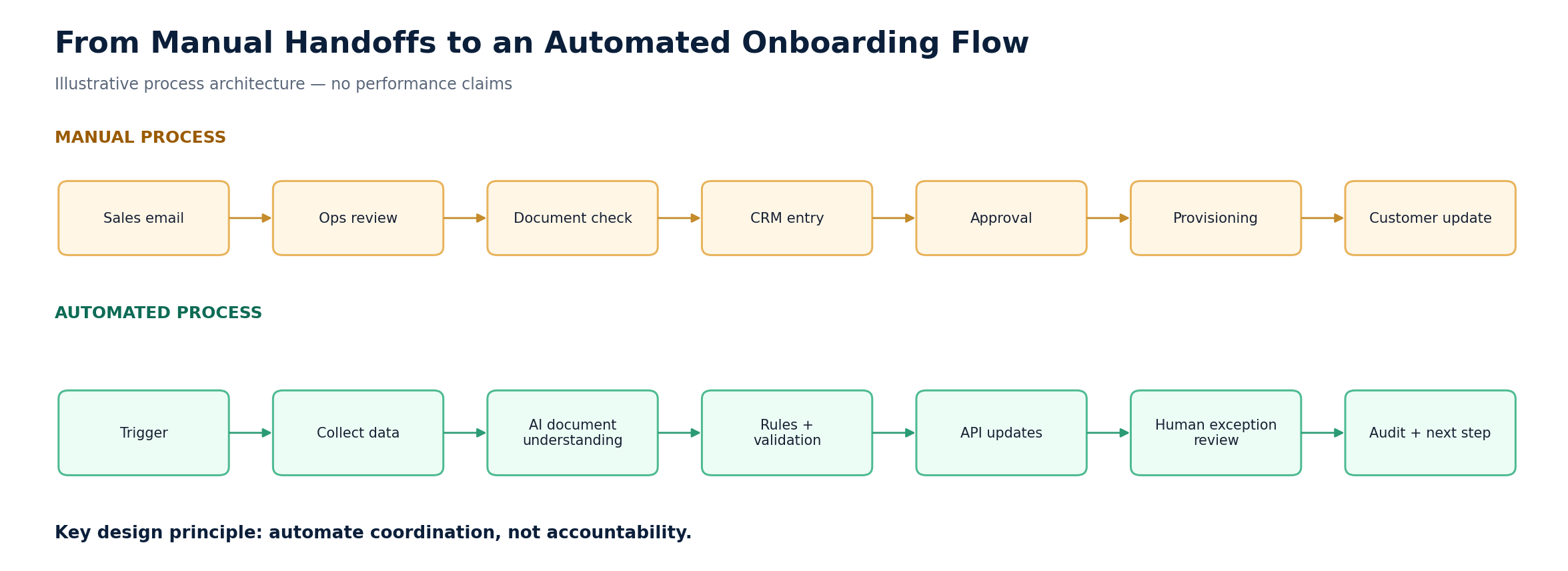
Figure 1. Manual handoffs versus an automated onboarding flow.
Why This Is a Business Process Automation Problem
A single automated email is not business process automation. Neither is a scheduled notification. Those are isolated automations.
Business process automation, or BPA, coordinates an entire process across tasks, systems, data, decisions and people. In this onboarding example, the real process begins when a deal is ready for onboarding and ends when the customer is active, correctly configured and handed over to the right team.
That larger process may include customer information, documents, CRM records, internal approvals, billing setup, account provisioning, communications and exception handling. A useful business process automation system connects those pieces instead of automating one small task and leaving employees to manage everything around it.
The First Rule: Do Not Use AI Where Normal Software Is Better
One mistake in AI automation projects is assuming every step needs AI. It does not.
If a field must contain an email address, normal validation can check it. If a customer above a certain risk level needs manager approval, a business rule can enforce it. If a CRM record already exists, an API can check the CRM. None of those tasks requires a language model.
AI becomes useful when software has to deal with information that is less predictable: a customer describing requirements in an email, a PDF with an unfamiliar layout, a contract that needs summarizing, or a message that must be classified even though the customer did not choose a predefined category.
Design principle AI interprets. Rules validate. APIs move data. Humans handle judgment. |
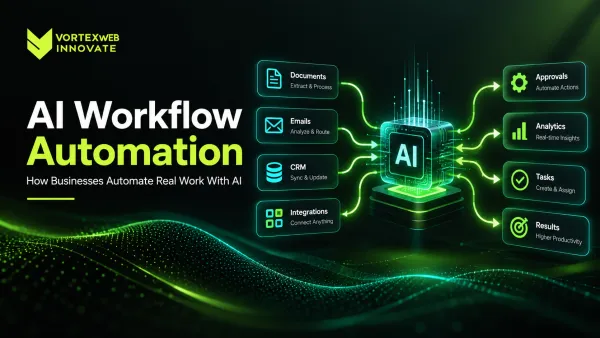
For a deeper explanation of how AI fits inside automated workflows, see AI Workflow Automation.
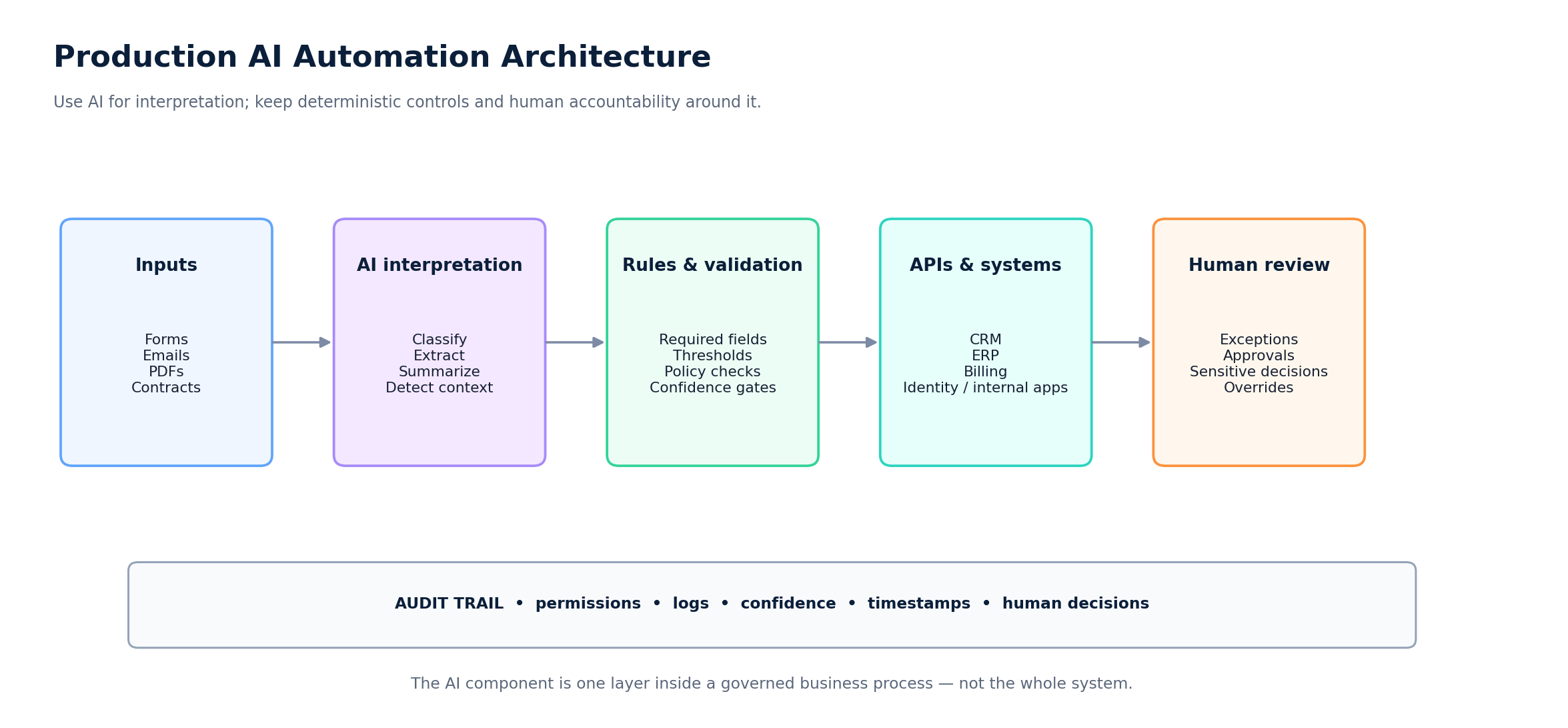
Figure 2. A production AI automation architecture keeps deterministic controls and human review around the AI layer.
The Automated Customer Onboarding Workflow
The redesigned process starts with one goal: stop using people as the connection between systems.
Step 1: Start the Workflow From a Real Business Event
The workflow should not begin because someone remembers to start it. It begins automatically when a defined event occurs, such as a deal moving to an approved stage in the CRM.
The system creates an onboarding case with the customer name, account owner, deal information, onboarding type and current status. This is basic task automation, but it removes one of the most common weak points: an untracked manual handoff.
Step 2: Collect Structured Information First
Information that can be collected in a structured format should stay structured. Company name, billing information, primary contact, required service, region and account type do not need AI; a form or connected system is more reliable.
But onboarding rarely stays perfectly structured. Customers send PDFs, attach contracts, write explanations in email, use their own terminology and submit incomplete documents. That is where the next layer becomes useful.
Step 3: Use Document Automation for Messy Inputs
Manual document review is one of the easiest places for an otherwise digital process to become slow again. An employee receives several files, opens them one by one, finds the relevant information, enters it somewhere else and then notices that one document is missing.
A document automation layer can identify the document type, extract relevant fields and associate the result with the correct onboarding case. The system might extract company information, dates, registration details, contact information or contract metadata.
Extraction should never automatically mean acceptance. A production workflow needs confidence thresholds, validation and exception handling. If an extracted value cannot be trusted, the case should go to a person.
Step 4: Check Existing Systems Before Creating New Data
Once the required information is available, the automation checks existing business systems. Does the company already exist in the CRM? Is there already an account under a slightly different name? Has billing information already been entered?
A workflow that cannot reach the systems where work actually happens is not end-to-end automation. It is another interface people have to maintain.
This is where API & Integration Engineering becomes critical: CRM, ERP, SaaS and internal systems must exchange information without manual copying.
Step 5: Let Business Rules Handle What Can Be Known With Certainty
AI can interpret context. It should not replace deterministic rules where deterministic rules are available. If a customer must supply three documents, software can enforce it. If a particular account type requires finance approval, the workflow can route it. If a contract value crosses a defined threshold, a senior approver can be required.
Putting these checks into software creates consistency. The outcome no longer depends on whether a particular employee remembered every requirement that day.
Step 6: Turn Missing Information Into a Workflow State
A missing document should not cause the entire process to stop silently. The case should move into a known state, such as “Waiting for Customer Information.”
The system knows what is missing, when the request was sent, who owns the case and when a reminder should be triggered. When the customer replies, the workflow continues from the same point instead of forcing someone to reconstruct an old email chain.
Step 7: Make Approvals Easier, Not Just Faster
Approvals are often treated as a notification problem: send a manager a message and wait. A better approval workflow provides context. The reviewer should see what they are approving, which checks have passed, what exceptions exist and what decision is required.
A standard account may continue after basic validation. A non-standard case may require manual review. A high-risk case may require several approvers. The workflow manages those paths explicitly.
Step 8: Use AI to Prepare Work Without Owning the Decision
AI can prepare a summary for a reviewer: what the customer requested, which documents were submitted, what information was extracted, what checks passed and what still needs attention.
The employee then makes the actual decision. The same model works for communication: AI can draft a request for missing information, while sensitive or unusual messages remain subject to review.
That boundary is central to how Vortex approaches production AI Solutions.
Step 9: Trigger the Next Systems After Approval
Approval should trigger the next part of the business process. Depending on the company, the workflow may create or update the CRM account, prepare a billing profile, create internal tasks, assign an account manager, provision access, notify operations or send the customer the next onboarding step.
Each action should use only the permissions it needs. The AI component does not need administrator access simply because AI exists in the workflow.
Step 10: Keep an Audit Trail
A business process should be explainable after the fact. Months later, someone should still be able to answer what the customer submitted, what information the system extracted, which checks failed, who reviewed an exception, who approved the account, which systems were updated and when each event occurred.
That audit trail matters for troubleshooting, operational reviews and security. It becomes even more important when AI is involved.
The same principle applies to Vortex's Security & Compliance Engineering approach: AI output is controlled and auditable, not inherently trusted.
Where the Business Value Actually Comes From
The obvious benefit of automation is speed. That is not always the biggest benefit. The more important improvement is often the reduction in coordination work.
Before automation, employees may spend part of every case checking status, looking for documents, entering the same information twice, reminding another department, asking whether approval happened or figuring out who owns the next step. Those activities rarely appear as one line item in a budget, but together they consume operating time.
A good digital process automation system removes many of those invisible handoffs. The team still makes the important decisions; they simply spend less time keeping the process alive.
How to Measure Business Process Automation ROI
A credible automation case begins with measurements taken before implementation, not invented percentages afterward. The same indicators should be measured again after the workflow has been stable long enough to compare like with like.
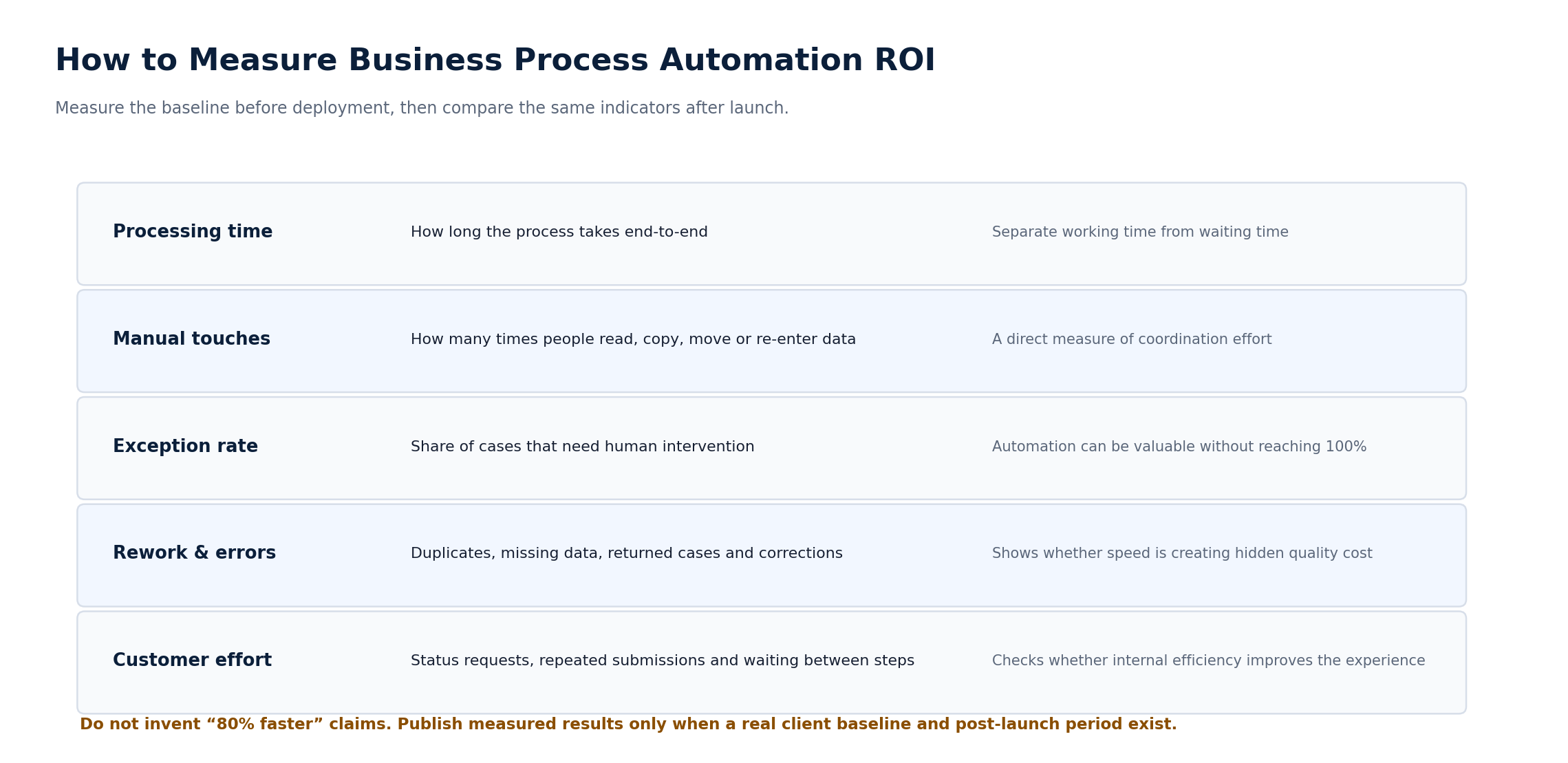
Figure 3. A defensible ROI framework for process automation.
Processing Time
Measure elapsed time from the start of onboarding to the point where the customer becomes active. Separate waiting time from actual working time; that difference often reveals where the process is really getting stuck.
Manual Touches
Count how many times employees have to read, copy, enter, move, request or verify information during one onboarding case. A reduction here is often a better indicator of automation quality than raw completion time.
Exception Rate
Track how many cases complete normally and how many require human intervention. The goal does not have to be zero exceptions. A workflow that automates straightforward cases and reliably routes the rest can still create significant value.
Rework and Errors
Track duplicate records, incorrect data, missing documents and cases returned because something was incomplete.
Customer Effort
Measure how often customers have to provide information twice, ask for a status update or wait between steps. Good business process automation ROI should be visible outside the company too.
Business Process Automation vs Workflow Automation
These terms are related, but they describe slightly different scopes. Workflow automation manages the movement of tasks through a defined sequence, such as document received → validation → manager approval → notification.
Business process automation usually covers the wider business outcome, such as signed customer → completed onboarding → active account. That larger process may contain several automated workflows. In this example, the approval sequence is workflow automation; the full customer onboarding journey is business process automation.
Business Process Automation vs AI Automation
AI automation is also not the same thing as BPA. A company can automate many processes without AI, and an AI feature does not automatically create an automated business process.
The two become powerful when combined deliberately: traditional automation handles predictable events, AI helps with variable information, APIs connect systems, and humans handle ambiguity and accountability. That division creates a much more reliable architecture than asking one AI agent to do everything.
Other Business Process Automation Examples
Customer onboarding is only one strong use case. The same design pattern can support finance, operations, sales, HR, healthcare and support workflows.
· Finance: receive documents, extract data, validate it, route approvals and update ERP records.
· Customer support: classify an issue, retrieve context, prepare a response and route exceptions.
· Sales: understand an enquiry, enrich the record, update the CRM and assign the right team.
· Operations: coordinate service requests, approvals, status changes, documents and notifications.
· HR: automate onboarding tasks, document collection, access requests and internal approvals.
· Healthcare administration: process documents and administrative requests while keeping clinical or sensitive decisions under qualified human control.
These business process automation examples differ in detail, but the architecture repeats: understand the input, apply rules, connect systems, manage exceptions and record the outcome. For a wider set of AI-led business scenarios, see Enterprise AI Use Cases.
How to Automate Business Processes Without Automating the Wrong Thing
The first step should not be choosing a tool. It should be mapping the current process. Look at what actually happens, not what the process document says should happen.
· Where does work wait?
· Where is the same information entered twice?
· Where do people leave one system to update another?
· Which decisions are predictable?
· Which decisions need judgment?
· Which exceptions happen repeatedly?
Only after those questions are answered should the technology be selected. The answer may be a no-code workflow, an integration, custom software, AI, or a combination of all four.
Where Business Process Automation Projects Usually Go Wrong
One common mistake is automating a bad process. If a company has five unnecessary approvals, software can make all five happen faster without making the process better.
Another mistake is ignoring exceptions. A demo is easy when every input is perfect. Real systems receive incomplete forms, broken files, contradictory data, API failures and customers who do something nobody expected. The exception path is not a side feature; it is part of the product.
Integration is another common problem. A workflow may look impressive until someone has to manually copy its output into the ERP. At that point, the automation simply moved the bottleneck.
AI governance also matters. If an AI component can read sensitive data or trigger business actions, the team needs explicit answers about permissions, validation, logging and human review.
When Business Process Automation Services Make Sense
A small workflow with two applications may be handled with an off-the-shelf automation tool. Custom business process automation services become more relevant when the process spans several systems, uses proprietary software, includes sensitive data, requires complex rules, needs AI interpretation or must support strict security and audit requirements.
This is also where business process automation consulting should be technology-neutral at the beginning. The goal should not be to sell a particular automation platform. The goal is to determine what architecture fits the process.
Sometimes the answer is a standard tool. Sometimes it is Custom Software Development. Sometimes it is a mix of existing platforms, integrations and a thin custom orchestration layer.
From Workflow Demo to Production System
A demo proves the happy path. A production system has to survive everything else.
· What happens if the CRM is unavailable?
· What happens if a document cannot be read?
· What happens if AI returns a low-confidence classification?
· What happens if the customer submits conflicting information?
· Can the workflow retry safely?
· Can a person override the automation?
· Can the company see exactly what happened?
· Can access be restricted by role?
· Can a business rule change without rebuilding the entire application?
Those questions are what separate a workflow prototype from a system people can depend on. Moving that prototype into a maintainable product also overlaps with Digital Product Development.
Frequently Asked Questions
What is business process automation?
Business process automation uses software to coordinate repeatable business processes across tasks, systems, data, approvals and people.
What is an example of business process automation?
Customer onboarding is a strong example. Information collection, document processing, CRM updates, validation, approvals, account provisioning and customer communication can be coordinated within one workflow.
What is customer onboarding automation?
Customer onboarding automation uses software to reduce repetitive manual work involved in moving a new customer from signup or signed agreement to an active account.
Does business process automation require AI?
No. Many processes can and should be automated using normal software rules. AI becomes useful when the workflow needs to understand variable or unstructured information.
What is document automation?
Document automation uses software to create, process, classify, extract or route information from documents with less manual handling.
What is the difference between workflow automation and business process automation?
Workflow automation typically manages a defined sequence of tasks. Business process automation usually covers a broader end-to-end business outcome involving several workflows or systems.
How should a company measure automation ROI?
Compare processing time, manual touches, rework, exception rate, operating effort and customer experience before and after implementation.
Can AI fully automate customer onboarding?
Some standard cases may become highly automated, but unusual, sensitive or high-impact decisions should often remain under human control.
Final Takeaway
The most useful automation projects usually start with a simple observation: people are spending too much time moving information instead of using it.
In this customer onboarding case, AI does not replace the workflow. It solves one specific weakness inside it: understanding variable information. Traditional software still validates rules. APIs connect systems. Workflow automation coordinates tasks. Humans make the decisions that deserve human judgment.
That combination is what turns disconnected automations into a real business process automation solution.
If your business still relies on employees to move information manually between email, documents, spreadsheets, CRM systems, ERP platforms and internal applications, the first step is not buying an AI tool. Map the process. Find the handoffs. Measure the delays. Then automate the parts that are actually costing the business time.
Vortex Web Innovate designs AI-enabled business workflows around existing systems, business rules, security requirements and measurable operational outcomes. Request a project estimate if you want to evaluate a process for automation.