EHR software development is the work of designing, building or extending the system that holds patient records, clinical documentation, scheduling and the billing that follows a visit, and connecting it to labs, other EHRs and payers. Before writing any code, most organizations should decide whether to buy a certified EHR, extend one they already run, or build a custom system, because that choice sets the scope, the integration work and the regulatory obligations.
This guide is for healthcare organizations and health-tech founders making that decision. If you already know you need a build partner, our healthcare software development services page covers how we work. Here we focus on planning: the modules, the workflow that ties them together, the data model, integrations, security, and what drives cost and schedule.
This article is general information, not legal or regulatory advice.
Buy a certified EHR, extend it, or build custom
Start here, because the answer changes everything downstream.
Certification matters if you take part in CMS programs. The ONC Health IT Certification Program is a voluntary program for certifying health IT, and CMS's Promoting Interoperability programs require certified health IT (ONC). CMS says certified EHR technology (CEHRT) must be certified by ONC by the last day of the reporting period (CMS). A system you build yourself is not certified health IT unless it goes through that program. If your organization relies on CEHRT, replacing the certified core with custom software is a much bigger decision than it first looks. Check your program obligations with your compliance team for the reporting year in question.
That leaves three realistic paths:
| Option | When it fits | What you take on |
|---|---|---|
| Buy a certified EHR and configure it | Your workflows look like most practices in your specialty; you report to CMS programs that need CEHRT | Vendor fees, configuration, training, and accepting the vendor's roadmap |
| Keep the EHR, build around it | The EHR holds the record well but misses a workflow: intake, referrals, care coordination, specialty forms, patient-facing apps, reporting | Integration work through the EHR's APIs or interface engine; vendor app programs and sandbox access |
| Build a custom EHR or practice platform | You are a health-tech company whose product is the clinical workflow, or your setting is not served by existing products, and CEHRT is not a requirement for you | The whole system: clinical data model, audit, security, integrations, billing formats, and long-term maintenance |
Many provider organizations land in the middle row: tools beside the EHR that read from it, write back to it, or both.
One choice shapes the middle path more than any other, which is whether your new software only reads from the EHR or also writes back to it. Writing orders, notes, results or appointments back into the record usually means more vendor sign-off, more testing, and someone on your side who owns each field.
Core modules of an EHR
If you build or extend, these are the parts you will scope. Most products need only some of them.
- Patient identity and demographics. Registration, identifiers, insurance details, and links between duplicate or related records.
- Scheduling. Providers, rooms, visit types, and the rules your front desk actually uses.
- Clinical documentation. Notes, vitals, problem lists, allergies, medications, and specialty forms.
- Orders and results. Lab and imaging orders out, results back, tied to the right patient and visit.
- Prescribing. Where it is in scope, with orders tied back to the same record.
- Billing. Fee capture at the visit, claim creation, and posting the payer's remittance.
- Patient portal. Booking, forms, messages, results and payments, all reading the same record.
- Reporting. Operational dashboards and quality measures.
- Decision support. Alerts, order checks and, where in scope, predictive models or AI tools that draft notes for a clinician to sign.
- Administration. Roles, permissions, audit review and configuration.
The list is the easy part. The hard part is the one record that all of these modules write to.
One encounter, from booking to billing
An encounter is the anchor for the work around a single visit. If you get the encounter right, the modules fit together. If you get it wrong, notes end up attached to the wrong visit and bills do not match the care given.
Our EHR, clinical visits and practice billing case study shows the pattern. The case page describes a platform where staff book the visit, write up the care, and send the bill for the services on record, all through one encounter service. Some details from that page are worth copying into your own plan:
- One service creates encounters. The staff interface checks permission, then hands the request to the encounter service, which validates it, assigns an encounter number and registers a UUID. A FHIR request becomes the same internal operation, so a visit opened through the API follows the same rules as one opened at the front desk.
- Forms can vary, the encounter does not. Each form keeps its own fields in its own tables, and a shared index links them to the encounter. New form types can be added without changing how the encounter is built.
- Deleted means deleted. The active-encounter lookup checks deletion state as well as the UUID, so a removed encounter does not come back because an underlying row still exists.
- Billing starts from the visit. The encounter's fee sheet feeds claim creation and remittance posting, using the US billing formats the platform supports (the case page lists X12 and CMS-1500).
- Patients and staff have different access. Patient-context tokens are tied to the patient's UUID, and staff actions need matching permissions.
When you map your own workflow, walk one real visit from start to finish with the people who do it. Note who opens the record first, who touches it next, and where the paperwork goes after the patient leaves. The encounter design falls out of that walk.
Data model and audit trail
Clinical data changes over time, and the history is part of the record. Two design rules save a lot of trouble later.
Corrections should create a record, not overwrite one. In our clinical records and patient data platform, an existing observation cannot be saved without a change message. When a clinical value changes, the service adds a replacement and voids the earlier observation, keeping the reason on record. Both versions stay in the encounter history, and interceptors block direct edits that try to skip this path. A reviewer can tell an original from its correction and read why it changed.
Permissions belong to the operation, not the screen. That same platform enforces roles and privileges on service calls, with object-level rules for finer control. Clinician screens and API modules call the same services, so a request that arrives through an integration gets the same checks as one from a screen.
Two more decisions belong in your data model:
- A shared vocabulary. The clinical records platform uses a concept dictionary so each program can use its own terms inside one shared model. If you will report across clinics or specialties, decide early how codes and terms map to each other.
- Changes integrations can rely on. That platform saves entity events as outbox records in the same transaction as the clinical data, so a committed change is not lost if the publishing process stops.
The HIPAA Security Rule also asks for audit controls and integrity protection for electronic PHI (45 CFR 164.312). A correction model like the one above helps with integrity. Audit logging of reads as well as writes covers the "who looked at this chart" question.
Decision support and AI-drafted notes
If you buy a certified EHR or build around one, decision support has a defined floor. ONC criterion 170.315(b)(11) says the EHR must let a limited set of identified users switch on decision support interventions. Those include evidence-based interventions and predictive ones. The user's role decides who can set them up. An intervention has to appear while the user is working in the system (45 CFR 170.315).
Users can also give feedback on an evidence-based intervention, and the EHR must let a limited set of users export it. The export names the intervention and the action taken. It also records the user, the date and the location. A team that builds its own alerts should design this record in from the start, because it shows which alerts people act on.
ONC published a deregulatory final rule on October 28, 2026 (Federal Register). Its changes to this criterion take effect on December 28, 2026. Until then, (b)(11) still has rules on source attributes and on managing the risks of predictive interventions. ONC added those rules in its HTI-1 rule to make AI and predictive algorithms in certified health IT more transparent. Once the new rule applies, a certified EHR no longer has to show who built a predictive model or how its risks were managed.
Users will still be able to switch on predictive interventions. The data these interventions must be able to use becomes narrower. It is the data required for evidence-based interventions, plus clinical notes and the assessment and plan of treatment. If your clinical governance needs source and risk details for a model, the model's developer will be the place to ask for them.
Tools that draft notes raise a different question, which is what enters the patient record. We recommend that a clinician review and sign any AI-drafted text before it is saved to the chart. The record should also mark which parts the tool drafted. The draft and the signed note can be stored as separate versions, the way the correction model above keeps an original observation and its replacement. A reviewer can then see what the clinician changed.
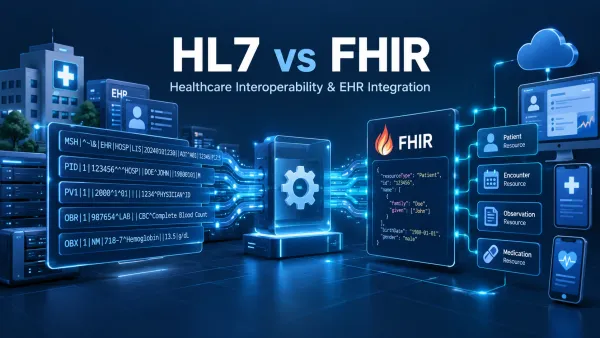
HL7 and FHIR integration
An EHR that does not exchange data is of little use. Most projects deal with two standards:
- HL7 v2 messages carry events such as admissions, orders and results between hospital systems, often through an interface engine.
- FHIR exposes the record as resources (Patient, Encounter, Observation and so on) through APIs.
Our guide on how HL7 v2 and FHIR differ covers when to use each. For planning, two facts matter.
First, certified EHRs must offer a standardized FHIR API. ONC's criterion 170.315(g)(10) requires FHIR R4 with the US Core implementation guide, SMART App Launch for authorization, and bulk export for groups of patients (ONC test method). SMART App Launch is the HL7 specification apps use to launch from and get authorized by an EHR (HL7). The regulation adopts FHIR R4.0.1, US Core 6.1.0 and SMART App Launch 2.0.0. Group export uses FHIR Bulk Data Access v1.0.0 (45 CFR 170.215). The earlier US Core 3.1.1 and SMART App Launch 1.0.0 versions expired on January 1, 2026. If you are building around a certified EHR, this is often your cleanest read path. Check which versions your EHR supports before designing mappings.
Second, the hard part is usually operational. Our FHIR integration with access policies and a local message queue case study shows a few problems you will meet:
- Concurrent edits. The backend saves a resource, its history and its search entries in one transaction. A conditional update must name the version it expects, and a mismatch gets a precondition failure, leaving the stored record unchanged.
- Downtime. An on-site agent takes in HL7 v2 messages over MLLP and writes them to a local store before sending. Messages stay queued while the link to the backend is down, and the agent reconnects as soon as it can.
- Duplicates. Channel and message-control identifiers let the agent spot repeated messages.
- Field-level access. Policies can limit resource types, hide fields or mark them read-only for a given caller.
Plan for test patients and a non-production EHR environment from the start. Many EHR vendors require you to join their developer or app program and pass review before you get production access, and that review often sets the schedule more than the code does.
Security and HIPAA
An EHR holds electronic PHI, so the HIPAA Security Rule's administrative, physical and technical safeguards apply to the organization running it (HHS). Any cloud provider that stores that data for you is a business associate and needs a BAA, even if it only holds encrypted data without the key (HHS cloud guidance).
We cover the details, including a requirement-by-requirement build checklist, in our HIPAA compliant software development guide. For EHR planning, three points matter most:
- Decide where PHI lives, who can see it, how long it is kept, and what gets logged, before the first sprint.
- Keep PHI out of development and test environments. Use synthetic patients.
- Controls in the code do not make a deployment compliant on their own. The practice-management case page says so directly: clinical deployment review and security setup are still needed before a practice goes live.
Data migration from a legacy system
ONC's change management primer names three areas to assess before a new EHR is chosen. Data migration is one of them, next to workflow and training needs (ONC primer). Records can reach the new system by scanning, by electronic migration from the old system or by manual data entry (ONC literature review). Most projects use more than one of these.
We treat migration as clinical work as well as data work. A medication or allergy that fails to move leaves a gap in the chart, and a clinician may not notice it.
A migration plan should settle these points:
- What moves: full history, a recent window or summaries only. The old system stays read-only for lookups.
- Local codes for problems, medications and lab tests map to the vocabulary the new system uses. Every value that does not map goes on a list, and each one gets an owner who decides what happens to it.
- Duplicate patients are merged in the source before the load, or the new system inherits them.
- Trial loads run in a separate environment, and clinicians compare sample charts with the source. For scanned charts and charts entered by hand, someone checks a sample against the paper record. ONC's long-term care primer calls hand entry of chart data abstracting, and it also lists quality control on abstracting (ONC LTPAC primer).
- After every load, record counts are compared by patient and by record type. Each difference is explained before the next run.
- The cutover plan fixes the freeze window, the final load of recent changes and what staff do while the systems switch over.
Two design choices make later questions easier to answer. Every migrated record keeps its source system and original ID, so a reviewer can trace any value back. Migrated data enters through the same correction model as new data, so the history stays readable. Trial loads are the one test step that may need real records. If they do, the trial environment needs the same controls and BAA coverage as production, and that data stays out of everyday development.
What drives cost and timeline
We have not found a neutral public source for EHR build costs. The published figures come from development vendors, and they sit far apart. Itransition says custom-made systems "can cost between $50k and $500k", depending on features and integrations. It says the whole process "can take from 6 months to 3 years" (Itransition). ScienceSoft says custom EHR development "can range from $120,000 to over $2,000,000". It quotes "2–4 months" to release a first version with priority features (ScienceSoft).
These are each vendor's own claims, as shown on their pages on November 10, 2026. The ScienceSoft timeline covers a first release only, so it does not compare directly with Itransition's figure for the whole process. Neither page shows the scope or method behind its numbers, and we do not publish a range of our own. A budget has to come from your own scope, and these factors move it most, roughly in order:
| Driver | Why it matters |
|---|---|
| Build, extend or buy | Building a full EHR covers every module above; extending one covers a single workflow |
| Number of integrations | Each EHR, lab, imaging system, pharmacy network or clearinghouse is its own mapping, testing and monitoring work |
| Read-only vs write-back | Writing back into an EHR adds vendor review, more testing and field ownership |
| EHR vendor app review | Often the slowest step, and more developers will not speed it up |
| Specialties and forms | Each specialty brings its own templates, codes and edge cases |
| Billing scope | Fee capture alone is far smaller than claims, remittance posting and denials work |
| Data migration | Volume, data quality and how many legacy systems the records come from |
| Roles and sites | More roles mean more permission rules; multiple practices raise questions of data separation |
| Certification | Pursuing ONC certification adds criteria, testing and documentation that a non-certified build does not need |
| Security and hosting | Audit, access review, backups, contingency planning and BAA-covered infrastructure |
| Support after launch | Interfaces need monitoring, and standards and payer rules change |
For a real number, write down your modules, integrations, data volumes and whether you write back to the EHR. A vendor can only estimate what you have described.
Phases and team
A workable EHR project usually runs in these phases:
- Discovery. Watch the work as it happens today, follow PHI from where it enters to where it is stored, and list every system involved. Output: scope and an integration map.
- Architecture. Settle the encounter model, the data model, sign-in, integration boundaries, security controls and hosting, and write them down.
- Incremental build. Ship in short steps against EHR sandboxes, with clinical and operations staff using working software as it is built. Workflow problems show up much faster on real screens.
- Integration and user testing. Test with test patients: mappings, duplicates, out-of-order messages, downtime and reconciliation. Then have users run their real workflows.
- Training and adoption. Train staff by role on their own workflows, with test patients in a training environment. Plan a period of hands-on support after go-live. When staff work around the system, record it, because a workaround often points to a workflow the design missed.
- Launch and monitoring. Watch the interfaces from day one, then either keep running support or hand over with documentation.
ONC's 2013 literature review of EHR implementations gives some evidence on how to train (ONC literature review). One case study in that review looked at six organizations reputed to follow best practice, and it did not compare them with other organizations. It found that two methods led to better learning at all six sites. In scenario-based training, clinicians worked in the EHR on a hypothetical patient. Preloading patient records meant that physicians entered data from patient charts into the EHR to create the electronic records. They were required or encouraged to do this work themselves. The review also counts super-users and clinical champions as good training practice, along with support throughout the rollout and retraining.
Usability affects how much training a team needs. ONC's change management primer notes that a hard-to-use system needs more training time. It can also add to user error and fatigue (ONC primer).
On your side, you will need a clinical lead who can make workflow decisions, a data owner for each feed who can approve mappings, someone who manages the EHR vendor relationship, and your privacy or security officer. On the build side, expect engineering, integration and QA skills, plus someone who understands clinical workflows well enough to question requirements.
FAQ
What is the difference between EHR and EMR software?
Many people use the terms interchangeably, and ONC has said it uses "EHR" almost exclusively (ONC). Its own definitions treat them as two different records. An EMR is a digital version of the paper chart in one clinician office, clinic or hospital. The providers there use it mainly for diagnosis and treatment. An EHR holds information from all the clinicians involved in a patient's care. It shares that information with other providers, such as labs and specialists, and follows the patient to other settings (HealthIT.gov).
For a build, the difference shows up in data exchange. EMR software development for one practice can start with a smaller integration scope, which grows once records have to reach labs, referral partners or patient apps. HIPAA safeguards apply under either name.
Should we build a custom EHR?
Usually not, if you are a provider organization that relies on certified EHR technology for CMS programs. Building around a certified EHR is more common. A custom build makes more sense for health-tech companies whose product is the clinical workflow itself.
Do certified EHRs have APIs we can build on?
Certified EHRs must provide a standardized FHIR R4 API under ONC criterion 170.315(g)(10). The deregulatory final rule that ONC published on October 28, 2026 removes several other criteria when it takes effect, and it keeps this one. Access still goes through the vendor's app registration and review process.
How long does EHR integration take?
It depends mostly on the EHR vendor's app review, the number of feeds, whether you already run an interface engine, and how quickly your team signs off on mappings. A real estimate needs your specific scope.
Is an EHR we build "HIPAA compliant" out of the box?
No software is HIPAA compliant on its own. HIPAA obligations fall on the covered entity or business associate running the system, and HHS does not certify products. The software can provide the safeguards those organizations need.
Plan your EHR project
Start with the buy, extend or build decision, then walk one encounter end to end with the people who will use the system. Our custom software development services page explains how we run builds like this. When you have a scope, you can get a range for your EHR project.