
With headless commerce, the storefront your buyers use and the commerce engine that runs it are built as two separate systems, and your team ships the front end on whatever schedule suits it. Products, prices, carts and orders stay in the engine behind it, and the front end asks for them over APIs. The point of the split is that you can redo the front end without going near checkout logic, and the same catalog can serve your web store, a buyer portal and your sales reps' app.
The catch is that you now run more systems. If you sell B2B, you also have design questions that most retail guides never get to. When every account has its own contract, whose price goes on the product page? And who gets the last word on stock, the store or the ERP? Below we cover the architecture and the trade-offs we plan around. We also cover the cases where a standard platform is the better call.
What Is Headless Commerce?
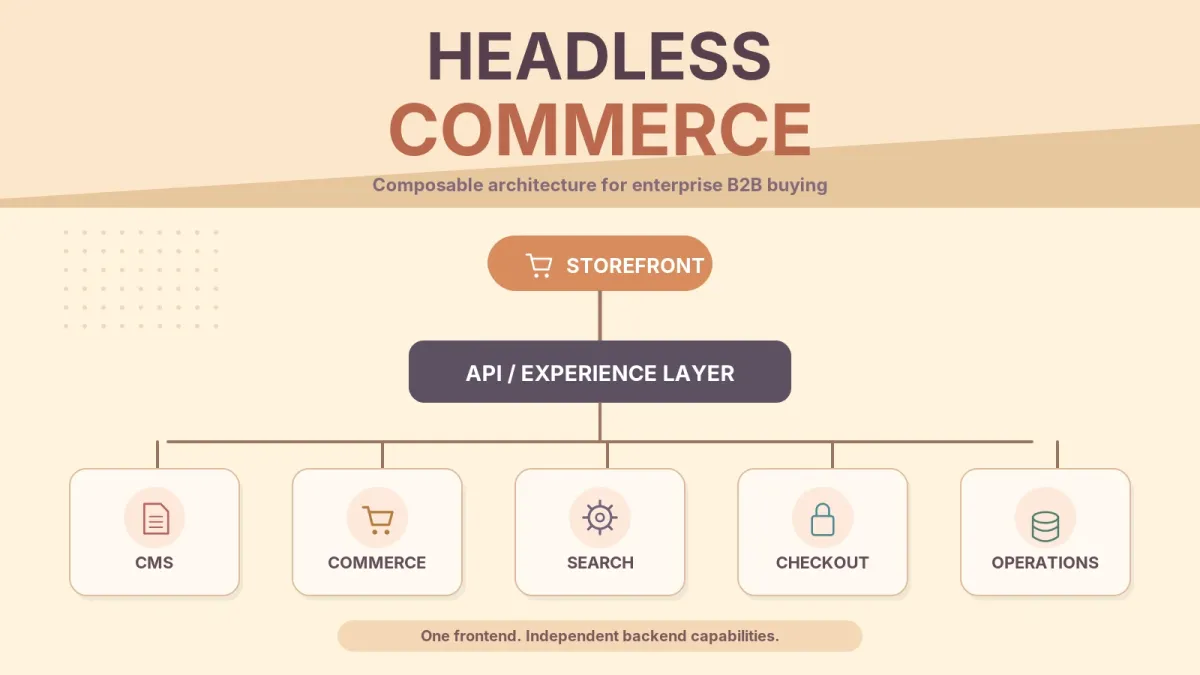
Headless commerce means the storefront, the part buyers see, runs separately from the commerce engine that holds the catalog, prices, carts, checkout and orders. The front end asks the engine for data and actions over APIs, so either side can change without the other, and one engine can serve a web store, a buyer portal and a mobile app.
Shopify's headless overview puts it in one line: "Headless commerce separates your storefront's frontend from its backend." The front end doesn't have to be a website, either. BigCommerce's introduction to headless commerce says the storefront "might be a CMS, native mobile app, kiosk, static site, or any other frontend solution you can imagine."
How Headless Commerce Works
It helps to follow one page view.
Say a purchasing manager at one of your distributors clicks through to a product page on your portal. That request hits a CDN or edge network first, Vercel or Cloudflare for example. If the page or image is already cached there, the buyer gets it straight back. Anything else goes on to the front-end app, often React with Next.js or Vue with Nuxt. That app then asks several services for data at the same time. From the commerce engine it gets the product, this buyer's account price and the cart. Marketing copy and images come from a headless CMS, for example Contentful or Sanity. Search is a service of its own, often Algolia or Elasticsearch. Behind all that sit the ERP and the order management system, which hold what finance cares about, like invoices and credit, along with stock and order status.
Each layer has its own owner and release schedule. Keeping them apart is the reason to go headless at all.
| Layer | Its job | Usual owner |
|---|---|---|
| Edge / CDN | Caches pages and files close to where the buyer is | Platform or DevOps team |
| Front end | The pages buyers see, and the navigation between them | Front-end engineering |
| Commerce engine | Catalog and prices, carts, checkout and orders | Commerce or engineering team |
| Headless CMS | Holds content and landing pages and runs the editorial workflow | Marketing |
| Search | Builds the index, the facets and the result ranking | Engineering, with input from merchandising |
| ERP / OMS / WMS | Invoices, credit, stock and shipping | Finance and operations |
On a traditional platform you'd get all of these as one product with one theme system. When they're split up, marketing doesn't have to wait on a deploy to publish a page, and engineering doesn't have to wait on a content freeze to change the front end. The flip side is that somebody now has to keep six systems in agreement.
Shopify is a clear example of the commerce side going headless. Its Storefront API and Hydrogen framework let you keep Shopify's checkout and admin while you build the front end yourself. The Storefront API, in Shopify's words, "serves products, collections, search, and the cart, and hands customers off to checkout." On a custom build it's the same idea, only your own team writes the API.
Headless vs Traditional vs Composable Commerce
The headless vs traditional commerce question comes down to what ships as one product. A traditional platform ships the storefront and the commerce engine together, with one theme system and one release cycle. Headless splits off the storefront and leaves the back end whole. Composable commerce goes a step further and breaks the back end into services (search, pricing, promotions, payments) that you pick and replace one at a time.
The cells are our own analysis. The one quoted line in them is Shopify's.
| Traditional platform | Headless commerce | Composable commerce | |
|---|---|---|---|
| What is split | Nothing: front end and back end ship together | The front end from the commerce engine | The front end, and the back end into separate services |
| Who builds the front end | The platform's themes, customized by your team or a partner | Your team or a partner, on a framework you choose | Same as headless |
| Where content lives | The platform's built-in CMS | Usually a headless CMS | A headless CMS, as one service among several |
| How you change a part | Upgrade the platform as a whole | Rebuild the front end without touching checkout | Replace one service, such as search, while the others keep running |
| Team you need after launch | Store admins, plus a developer for theme and app work | A front-end owner, plus someone for the integrations | A front-end owner, plus people who manage several vendors and the integrations between them |
| Cost to run | Lowest of the three | Higher. Shopify: "A headless storefront costs more to build and run than a theme." | Usually the highest, because every service adds a vendor, a contract and an integration |
| Typical fit | One team running one store, where time to market matters most | Several channels, brands or regions on one engine, or front-end and content teams that need to work apart | Several teams that want to replace capabilities over time, on their own schedules |
Read the table left to right as a question of how much you need to change separately. Shopify sets its own test for when to move past its themes: "If a merchant's business systems, processes, or customer experience can't be achieved with Shopify's sales channels, themes, and apps, then consider building headless." We apply the same kind of test, and only recommend headless or composable when the business needs what the split gives it.
What Changes When the Buyer Is a Business
Retail headless guides assume each product has one price, and in B2B that's rarely true. Take a manufacturer selling the same valve to several distributors, where each distributor has negotiated its own contract price. A public product page can be cached at the edge for everyone. One account's price can't, because the next person to load the page might work for a different account. So we build that page from two pieces. One is the description, specs and images, which every visitor sees the same way, and the cache can keep it. The other is the price, stock level and "add to order" block. Those depend on the account, so we fetch them on every request and mark them private, and shared caches won't store them. The private and no-store directives that make this work are explained in MDN's guide to HTTP caching. Get this wrong and it goes one of two ways. Either one customer ends up looking at another customer's price, or someone switches caching off to be safe and the speed you went headless for is gone.
Then there's the ERP. In most B2B companies it is the system of record for price lists, credit limits and stock. The storefront reads from it, and somebody has to decide how often. Calling it in real time keeps things accurate, but now your page speed depends on the ERP. Syncing every few minutes is faster, but a buyer might see stock that has already sold. We settle that rule for each type of data during the architecture review, before anyone builds the first order flow.
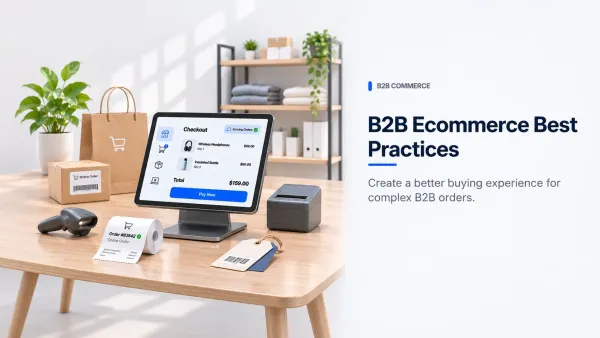
Checkout is where B2B gets complicated. That's where you'll find approval chains and purchase orders, plus credit terms and buyer roles. A headless front end makes these flows easier to design well, because you aren't forcing a consumer theme to do something it was never built for. But the rules themselves still live in the commerce engine or the ERP. A credit check should never be decided in the front end. Our guide to B2B ecommerce best practices goes through approval flows, quotes and purchase orders in more detail.
When we scope headless ecommerce development for a B2B seller, pricing, the ERP and checkout come first, during a two-week commerce architecture review. The answers on those three shape the design more than the choice of framework does.
What You Gain and What You Take On
Before a client decides, we put the benefits of headless commerce and its running costs side by side like this.
| You gain | You take on |
|---|---|
| Content changes without a code deploy | A CMS to model, govern and pay for |
| One catalog sold through more channels, brands or regions | Each channel is another integration to build and test |
| Portals, quick order and approval screens designed your way | Someone on the front-end side who answers for speed and accessibility |
| The option to replace search or the CMS by itself, with no replatform | More vendors and contracts, and more places that can fail |
| Close control over rendering and Core Web Vitals | Cache rules and preview environments to build and keep up |
If a gain on the left fixes a problem you have today, the cost next to it is worth taking on. We'd be wary of paying for one that only solves a problem you think you might run into someday.
What Is Composable Commerce, and Where Does MACH Fit?
Composable commerce builds the back end from separate components (catalog, pricing, search, promotions, payments) that you can replace one at a time, instead of one platform that does all of it. It usually starts with headless, because a composable back end still needs a front end of its own.
commercetools, a vendor that sells a composable platform, describes composable commerce as "a modern approach to building commerce platforms using independent, best-of-breed components." MACH is the other label you'll see next to it. The MACH Alliance, an industry body whose members are technology vendors, now describes its MACH Principles as a framework for enterprise technology that is "open, composable, and connected." It defines composable as "capabilities you can assemble, replace, and evolve independently," and lists what that means in practice: "microservices, headless architecture, best-of-breed selection, and continuous evolution without disruption." The Alliance also certifies ISVs, system integrators and enablers against these principles. So a MACH label tells you a vendor was assessed against them. It doesn't tell you the product fits your stack.
For a B2B team, composable adds work before it saves any. Each component is another vendor with its own contract, its own API and its own idea of what a product, a price or an account is, and each one needs a data mapping to the ERP and to the other services. Most of the effort, and most of the cost, ends up in those integrations. That's worth paying when you really need to swap pieces on separate schedules, say a search service your merchandisers have outgrown, while pricing and checkout stay where they are. If you'd replace the whole stack at once anyway, a headless front end on one commerce engine is the simpler build. Our composable commerce case study covers a backend a private client used to control how an order moves through checkout and fulfilment.
Architecture Patterns We See in B2B
The headless commerce examples below are illustrative patterns. None describes a specific client, and real projects mix them.
One catalog, two front ends
Picture a distributor whose buyers order through a self-service portal while its sales reps carry a tablet app on customer visits. Both pull the same catalog and contract prices from one commerce engine. The rep app needs a few things the portal doesn't, like placing an order for a customer or taking an order at a job site with no signal. Without headless, the rep app tends to end up with its own copy of the catalog, and over time the two stop matching.
Several brands on a shared foundation
Now take a manufacturer that sells under several brands in more than one region, and every brand wants its own look. Our approach there would be a single component library and design system, with theming and localization layered on, so each brand gets a theme of its own. Underneath, every brand uses the same catalog, pricing logic and order flow. A pricing bug gets fixed one time and the fix reaches all of them.
Content-heavy technical catalog
Some industrial suppliers have buyers who read spec sheets, compatibility charts and install guides before they order anything. The marketing and product teams change that content every week. With a headless CMS they can publish it themselves, without going through engineering. Meanwhile the commerce engine holds on to the parts that need tight control, which are price, stock and the cart.
Where a Headless CMS Fits
A headless CMS stores content and serves it over an API to whichever front end asks for it, so marketing can publish a landing page or a spec sheet without waiting for a code deploy. Price, stock and the cart stay in the commerce engine, which keeps content editors away from anything that can change an order. The CMS is also only one of the systems you can attach. Shopify's overview notes that because the front end and back end are separate, you can connect a CMS, a CRM, an ERP or a PIM "to either side."
You don't always need one. If content goes out through one storefront and your editors are happy with how they publish today, the CMS built into a traditional platform is usually the simpler choice, and it's one less system to pay for and govern. A separate CMS pays off when the portal, the rep app and the marketing site all draw on the same product content. On the content side, that's part of our headless CMS and composable web development work.
Failure Modes We Design For
Most headless projects that go badly do so in a handful of predictable places.
Stale prices top the list. Maybe a cache rule that was written for retail ends up storing a contract price. Or the ERP sync falls behind and the portal quotes yesterday's list. Our cache designs keep what's public apart from what belongs to one account, and if a sync runs late, somebody gets an alert.
Preview is the second. An editor builds a landing page in the CMS and then finds she has no way to see it with live products and prices until it goes out. A proper preview environment takes real time to build. Teams that skip it end up publishing the page just to see what it looks like.
Search drifts as well. The search index is a copy of the catalog. When a product is discontinued in the ERP and the index isn't updated, buyers find items they can't order.
Rendering can hurt SEO. If category and product pages only render in the browser, crawlers may see less than buyers do. Google's JavaScript SEO basics covers how rendering affects indexing, and it's direct about the fix: "server-side or pre-rendering is still a great idea because it makes your website faster for users and crawlers, and not all bots can run JavaScript." We render those pages on the server or at build time, and carry URLs, redirects and structured data across in any replatform.
Then there are the connections nobody watches. The storefront talks to the ERP, the WMS, tax and payments, and an order can get stuck at any one of those links. We monitor the health of those integrations and flag failed syncs for investigation, so an alert reaches your team and a customer is less likely to find the problem first. Our ecommerce API integration team builds the connectors themselves, including the order, inventory and warehouse flows.
When Not to Go Headless
If one team runs one store and getting to market fast matters most, we'd stay on a standard platform and extend it a little. A small catalog with a single price list is the same. So is a team that has no plan to hire or keep front-end engineers after launch. A headless front end that nobody owns tends to get slower every quarter. Shopify, which sells headless tooling itself, gives merchants the same warning in its headless overview: "Before you commit, make sure that the merchant accepts the added cost and complexity, and has developers to maintain the storefront after launch."
You should also wait if the real problem is somewhere else. Say your store is slow because of a bad ERP integration. A new front end won't change that, so we'd fix the integration first.
A Phased Way In
You almost never have to move the whole store in one go. We'd start with one piece, often the content pages or a single brand, and your current checkout keeps working behind it the whole time. After that piece settles down, we bring over the catalog and account pages. Checkout is the last thing we touch, since it has the most risk riding on it and the most business rules baked in.
If it's a full replatform, the URL inventory and redirect map are done before cutover. So are the data checks that prove the old and new systems match. Those steps protect your search visibility, but rankings can still move after a migration, so we keep watching them after cutover. We ship working features every two weeks, and each one gets a demo against acceptance criteria you've agreed to. You can read the full process on How We Work.
FAQ
Do we need composable commerce to go headless?
No. A headless front end works fine on one commerce engine with the back end left whole. Composable is a separate decision, and you can make it later, one service at a time, when a specific part of the platform (search, say, or promotions) starts holding you back. Until then, a single engine means fewer vendors to manage.
Does going headless help SEO?
It can, since you get direct control over rendering and page speed. It can hurt too, if pages only render in the browser or if redirects get missed during a migration. Whether it helps or hurts is down to the build. We write rendering, URL structure and structured data into the engineering requirements from the first sprint for exactly that reason.
Do we need our own developers after launch?
You need an owner for the front end, and we can fill that role if you don't have one in-house. After we configure the CMS, your marketing team edits content on its own. New features, performance work and framework upgrades still need a developer.
Can Shopify run headless?
Yes. Shopify, Shopify Plus included, can be the commerce back end through its Storefront API, while the front end runs on Hydrogen, Next.js or some other framework. You still use Shopify's admin and checkout. Our team builds on Shopify and Shopify Plus and on WooCommerce, and we also build custom stacks.
How much does a headless build cost?
Cost depends mostly on scope. The number of storefronts, brands or regions matters, and so does catalog size, along with the number of other systems the store has to stay in sync with. Our estimate form asks you for those details, with budget bands from under $50k to $1M+, and you get a range back within one business day.
Talk Through Your Architecture Before You Commit
If you're thinking about going headless, start with the questions in this guide. Who owns each layer? Where do contract prices come from? What happens when a sync fails? Our ecommerce development services begin with a two-week commerce architecture review that looks at your platform, your integrations and how ready you are for peak traffic, and you get a prioritized roadmap at the end.
Buttons: "Book a Technical Discovery Call" → /contact · "Get a Project Estimate" → /project-estimate