



Multi-tenant SaaS architecture means one deployment of your product serves many customer organizations, called tenants, while each tenant's data, settings and users stay separate from everyone else's. The main design decision is how much you share: one database with a tenant ID on every row, a schema per tenant, a database per tenant, or a mix of those for different customers.
That choice shapes your hosting bill, your migrations and what you can promise in an enterprise security review. Below we compare the models, then cover the parts teams usually find out about late.
What multi-tenant architecture means in a SaaS product
In a B2B product a tenant is usually one customer organization with many users. Microsoft's guidance adds a warning: one customer may need more than one tenant, for example separate development and production environments. Decide early what a tenant is, because it ends up in every table, token and log line.
The second thing to get straight is that tenant isolation and login security are separate jobs. A user can be authenticated and authorized and still reach another tenant's resources, because nothing about authentication on its own blocks that. Isolation means every data access is scoped by the current tenant, and you have to build that scoping on purpose.
Single-tenant vs multi-tenant
The first choice is whether each customer gets its own copy of the application and data stores, or shares one deployment with all the others. Microsoft's Azure guidance compares the two on cost and data safety, and on how far one tenant's load or one change can spread. The first four rows of the table draw on that guidance. The last two, operational effort and reporting across tenants, are our own additions.
| Single-tenant | Multi-tenant | |
|---|---|---|
| Data isolation | Each tenant's data is separate, which lowers the risk of accidental leakage | Built into code and data and then tested, because one scoping mistake can leak data between tenants |
| One tenant's heavy load | Stays inside that tenant's deployment | Can slow other tenants unless it is limited |
| Cost to serve each tenant | Grows with every tenant, because each one carries its own infrastructure | Lower, because tenants share components |
| Release risk | A change reaches one deployment at a time, so versions can drift apart | One release reaches every tenant, and so does a bad change |
| Operational effort | Many deployments to provision, migrate and monitor | One deployment, with tenant-aware controls inside it |
| Reporting across tenants | Data has to be pulled from many places | Simpler when tenants share a database |
Some parts stay shared in both columns. AWS calls a setup with dedicated resources for each tenant a silo. A silo still relies on shared identity and onboarding, and on one shared way of running the service. AWS says this is what "differentiates SaaS from a managed service model".
Pros and cons of a multi-tenant design
For the business, the differences in the table bring these gains:
- Because each customer costs less to serve, smaller accounts become worth having.
- The team keeps one version of the product, so a fix or a feature never has to be ported across customer copies.
- Once onboarding is automated, a new customer can start from a signup form with no deployment work from the team.
They also bring these costs:
- A tenant scoping mistake can expose one customer's data to another, so it is a security incident and has to be prevented on purpose. The sections below add a second lock in the database and a set of isolation tests.
- Because one release and one set of servers serve everyone, a single mistake can become an incident for every customer at once.
- Some enterprise requests take extra work in a pooled model. Per-tenant restore, data held in a specific region and customer-held encryption keys are the usual examples, and the section on picking a model shows when they justify the hybrid path.
The four common tenancy models
AWS groups SaaS designs into silo (dedicated resources per tenant), pool (shared resources) and bridge (a mix). At the database level, those usually turn into four concrete options.
Microsoft's Azure guidance uses its own names and does not map them to AWS's, so the matches here are our reading. Silo is closest to Azure's automated single-tenant deployment, and pool to its fully multitenant deployment. AWS defines bridge per part of the system, with some services in a silo and others pooled. It adds that the rules on a service's data, or its noisy-neighbour behaviour, can push that one service into a silo. The nearest Azure pattern is the horizontally partitioned deployment, which shares the app tier but gives each tenant its own database.
Azure's vertically partitioned deployment mixes by tenant instead of by component. Some tenants get their own setup, for example tenants that need higher performance or data isolation, while the rest share one. That is closer to the Hybrid option described below than to AWS's bridge.
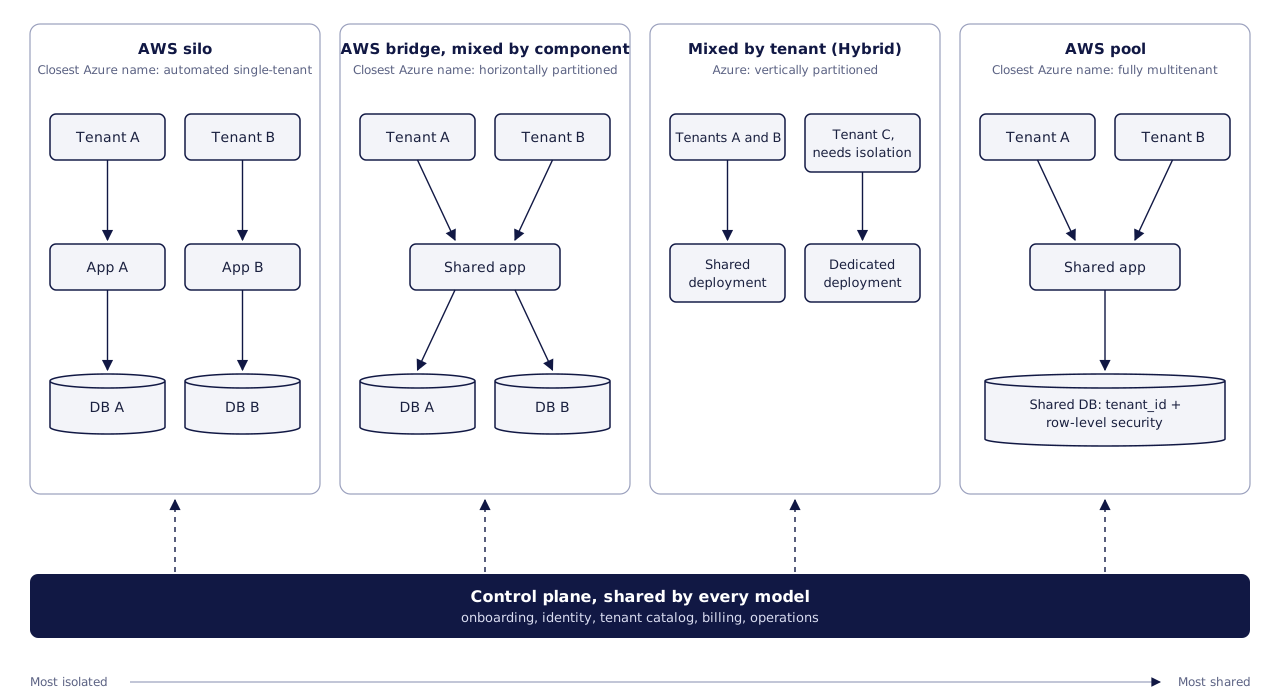
The silo column on the left is the most isolated model, and the pool column on the right is the most shared. Between those two, the middle columns mix shared and dedicated parts in different ways, one by component and one by tenant. The dashed control plane is the shared layer described after the single-tenant comparison above. In the pooled database, a tenant ID and row-level security keep the rows apart, as the sections below explain. Each of the database options below is a choice for the data tier inside one of these models.
Shared schema with a tenant ID. Every tenant's rows live in the same tables, and each row carries a tenant_id. It is the cheapest to run and the simplest to migrate, since there is one schema to change. Your code, or the database, has to apply the tenant filter on every query.
Schema per tenant. One database, but each tenant gets its own schema with the same table structure. You get cleaner separation and per-tenant backups are easier, but every schema change now runs once per tenant.
Database per tenant. Each tenant has a dedicated database while the application tier stays shared. Isolation is strongest and a heavy tenant cannot slow others' queries, but you need automated provisioning, and reporting across all tenants means pulling data from many places.
Hybrid. Most customers share a pooled database, and the ones with stricter contracts or heavier load get their own. Microsoft describes this as mixing a multitenant database with single-tenant deployments for customers who pay more or have unusual requirements.
| Shared schema + tenant ID | Schema per tenant | Database per tenant | Hybrid | |
|---|---|---|---|---|
| Data isolation | Logical, enforced by code or row-level security | Namespace separation in one database | Separate database | Varies by tenant tier |
| Infrastructure cost per tenant | Lowest | Low | Highest | Mixed |
| Operations effort | Lowest | Moderate; many schemas to track | High; needs automated provisioning and monitoring | Highest; two paths to run |
| Schema migrations | Run once | Run per schema; versions can drift | Run per database; versions can drift | Both patterns at once |
| Per-tenant restore | Hard; usually restore elsewhere and copy one tenant out | Easier | Easiest | Depends on tier |
| Noisy-neighbour risk | Highest | High (shared database server) | Lowest at the data tier | Low for isolated tenants |
| Typical fit | Many small and mid-size tenants | Moderate tenant counts, per-tenant structure | Few large or regulated tenants | Mixed customer base |
Microsoft's data guidance names two patterns to avoid: separate tables per tenant inside one database, and columns added to a shared table for one tenant.
How to pick a model
- What will enterprise buyers ask for? Microsoft lists three conditions that push you toward isolating a tenant: the tenant needs its own encryption keys, its own backup and restore policy, or its data stored in a specific location. If your target customers will ask for any of these, plan the hybrid path now.
- How many tenants do you expect? Hundreds or thousands of small accounts favour a pooled model. A handful of large customers can justify dedicated databases.
- How much can your team automate? Database-per-tenant without automated provisioning, migrations and monitoring turns into manual work that grows with every signup.
A practical default for many new B2B products is a pooled database with tenant_id on every tenant-owned table, plus a tenant-to-deployment mapping from day one. Keep the tenant ID even inside dedicated databases. Then moving a large customer to its own database later means copying rows, without having to rewrite how the code thinks about ownership.
Tenant context: resolve it once, carry it everywhere
Resolve the tenant in one place at the edge of the application, from the subdomain, a custom domain or a token claim. Check that the user belongs to that tenant, then pass it down explicitly.
The leaks usually happen outside web requests:
- Background jobs and queue consumers. A job that runs without tenant context can read or write across tenants. Put the tenant ID in every message and refuse to process messages that lack it.
- Caches. Include the tenant ID in every cache key, or one tenant's cached result can be served to another.
- Search indexes, file storage and exports. Each needs its own tenant scoping, separate from the database's.
Row-level security as a second lock
In a shared-schema design, one missing WHERE tenant_id = ? is a data leak. Row-level security (RLS) lets the database apply the tenant filter as well, so a forgotten filter in application code does not expose other tenants' rows.
In PostgreSQL, a few details from the documentation matter in practice:
- Once RLS is enabled on a table, normal access needs a policy that allows it. If no policy exists, a default-deny policy applies and no rows are visible.
- Table owners normally bypass RLS unless the table is set to
FORCE ROW LEVEL SECURITY. Superusers and roles with theBYPASSRLSattribute always bypass it. If your application connects as the table owner, your policies may not be doing anything. - A common way to pass the tenant to a policy is a setting read with
current_setting(). Set it withset_config(..., true)so the value only lasts for the current transaction, which matters when connections are pooled and reused between tenants.
Microsoft notes that RLS is harder to design and test, and many multitenant products skip it. We would still use it for shared tables holding sensitive customer data.
One example from our own work: in a transportation management platform, each transaction carries signed tenant-scope information, PostgreSQL checks the signature and its expiry, and forced row-level security applies the organisation and business-unit boundaries to the tenant tables. The transport and freight management case study describes how that keeps the scope in place even when an application query leaves its own filter out.
Testing tenant isolation
AWS calls a crossing of the tenant boundary "a significant and potentially unrecoverable event for a SaaS business". One of its design tenets, "Authentication and authorization are not equal to isolation", is why the opening section treats login and isolation as separate jobs. A leak across that boundary rarely raises an error, so the team has to look for it.
AWS also holds that isolation should not be left to each service developer, and that a shared mechanism should scope access to resources. In its serverless example for a pooled model, code reads the tenant context from a JWT and uses it to get tenant-scoped credentials from AWS Security Token Service (STS). Because those credentials come from the tenant context, they can only reach that tenant's resources. In a shared PostgreSQL database, the row-level security setup above does the same job for data. Tests then show whether that shared mechanism holds on every path a request or a job can take.
The table lists the negative tests we recommend. Its rows cover the API and the database, plus each place outside web requests where the tenant context section says leaks happen. The AWS and Microsoft guidance quoted on this page does not list these exact tests. Each test runs as a user of tenant A against a second test tenant, B, that holds similar data. A test passes only when the attempt to reach B fails.
| Layer | Negative test | Expected result |
|---|---|---|
| API | Request tenant B's records by ID, including through list filters and bulk endpoints | Not found, with no sign that the record exists |
| Database | Connect as the application role with no tenant set, then with tenant A set, and read a shared table | No rows or an error at first, then only tenant A's rows |
| Cache | Request a resource that tenant B loaded into the cache first | A result built for tenant A, never B's cached copy |
| Background jobs | Queue a job with no tenant ID, then a job that names B's records under A's tenant | The first is rejected, and the second changes nothing of B's |
| Files and exports | Open one of B's file paths or download links | Access denied |
| Search | Search for a term that appears only in B's data | No results |
We recommend running these tests in the build pipeline on every change, so a new leak fails the build before release. Each new endpoint or job type is a new path that the shared scoping mechanism has to cover, so each one should arrive with its own negative test.
AWS's reliability guidance adds a second group of tests. These look at load rather than data access:
- Cross-tenant impact tests
- Tenant consumption tests
- Tenant workflow tests
- Tenant onboarding tests
- API throttling tests
These are load and reliability checks, and the noisy-neighbour section below covers the problem they guard against. Container platforms have limits of their own as well. Google Cloud's GKE documentation says Kubernetes "cannot guarantee perfectly secure isolation between tenants", though its features may be enough for specific use cases. The negative tests above still apply to workloads on a shared cluster.
Per-tenant configuration and custom fields without forking code
Sooner or later a large customer asks for a field or record type nobody else has, and the tempting fix is a special branch. Microsoft's guidance warns against forking or customized infrastructure per tenant, because it blocks you from scaling, testing and shipping updates. Its suggestion is feature flags and tenant configuration, with custom data tracked in dedicated tables instead of extra columns on shared ones.
There are three common ways to store tenant-defined data:
- Metadata tables that describe each custom field, with values stored in a separate table keyed by tenant, record and field.
- A JSON column on the record, validated against a per-tenant definition.
- Generated structure, where tenant metadata creates real tables and columns, often inside a schema per tenant.
The hard part with all three is keeping the definition and the storage in step. In a CRM platform we worked on, administrators can add fields, relationships and whole new record types. Metadata describes each workspace's records and builds the database structure, views and API, and every workspace keeps its own PostgreSQL schema inside the shared database. Record settings and database changes ride in one transaction, so they commit or roll back as a pair, and developers can read a dry-run migration plan before applying it. The customer relationship and workflow management case study covers how permissions are applied to custom record types and single fields.
Tenant onboarding and lifecycle
A new customer can arrive through a signup form or through a contract that the provider's team sets up. AWS covers both, and says onboarding "can be initiated directly by tenants or as part of a provider-managed process". Its operations guidance adds that an internal process "should still automate all the elements of tenant creation". We agree, because when both paths run the same automation, a tenant set up by hand matches one created at signup.
The onboarding sequence
AWS's example flow runs in this order:
- A registration service starts the flow and coordinates each step after it.
- The tenant's admin user is created in the identity provider, along with any IAM policies the isolation model needs.
- Next comes the tenant record, with its tier and status held by a tenant management service.
- The billing system is told which plan or tier the tenant is on.
- Any infrastructure dedicated to the tenant is provisioned before the tenant is activated.
In Microsoft's version, the workflow then saves the new tenant's details to a central tenant catalog. That catalog is a natural home for the tenant-to-deployment mapping suggested earlier. For enterprise customers, the identity step is also where per-tenant SSO begins, as the SSO section explains.
We recommend making each step safe to repeat. If a run fails after the admin user exists, a second run should finish the job without a duplicate user, database or billing customer.
The tenant status from step 3 matters long after onboarding. Application code and background jobs should read it before they act, and so should billing. Active, suspended and offboarding are example states. A suspended tenant keeps its data but loses access until the status changes.
Microsoft lists the decisions to settle before the flow is built:
- whether onboarding is self-service, automated or manual
- where the tenant's data must live, and which compliance rules apply
- disaster recovery targets, as a recovery time objective (RTO) and a recovery point objective (RPO)
- what information to collect from the tenant, and how billing starts
- which environments the tenant needs
- how long provisioning may take, from seconds to days
Its deployment guidance also notes that "as the number of tenants grows, automation becomes increasingly important".
Lifecycle events after onboarding
A tenant's needs change after signup, and Microsoft's lifecycle guidance lists the changes to plan for. Each one is work for the automation that created the tenant. Trial tenants convert or expire, and active tenants need updates and more capacity as they grow. When a tenant moves to other infrastructure for rebalancing, an upgrade or a new region, the automation has to copy its data and change its routing. The automation that creates a tenant should also move one, because that makes the shared-to-dedicated path in the hybrid model practical. When two tenants merge or one splits in two, the same automation has to change which records belong to which tenant.
Offboarding comes last, with a retention period and a way for the tenant to come back later. Export and deletion are covered in the offboarding section below.
AWS also recommends testing the onboarding flow itself. A spike in signups should not overwhelm it, and third-party steps such as billing need tested fallbacks.
Noisy neighbours and rate limits
In any shared model, one busy tenant can slow down everyone else with a large import or an unbounded report. Ways to contain it:
- Per-tenant rate limits and quotas on the API, sized by plan.
- Fair queues, so one tenant's backlog of jobs does not block the others. Separate queues or per-tenant concurrency caps both work.
- Separate paths for heavy work, such as running exports and analytics against a replica or a warehouse.
- A move path. If one tenant keeps causing trouble, the hybrid model lets you move it to its own database.
Microsoft's guidance points to the Throttling and Rate Limiting patterns, and suggests testing noisy-neighbour effects alongside data leaks.
Per-tenant monitoring
Rate limits and quotas only help when the team can see which tenant is causing the load. AWS says providers need to view activity and health "through the lens of individual tenants and tenant tiers". Its guidance for the operations dashboard includes the health of the most active tenants and each tenant's resource consumption. When logs, traces and metrics carry the tenant ID, support staff can check one customer's numbers instead of a platform average.
Microsoft's account of the noisy-neighbour problem shows why averages mislead. It describes the case where "one tenant's performance is degraded because of the activities of another tenant". The same problem can appear when every tenant uses only a small share of capacity, but their combined use peaks at once. Per-tenant figures make both cases visible. On Kubernetes, resource quotas keep any one tenant from using more than its assigned share of the cluster, according to Google Cloud.
The same consumption data feeds billing and margin checks. AWS describes metering data that is "typically sent to a billing system", which the billing section below covers. Microsoft adds that measuring each tenant's use shows whether serving that tenant is profitable.
SSO for SaaS multi-tenant architecture
Enterprise customers will want their staff to sign in through their own identity provider. In a multi-tenant product, SSO is configured per tenant, which raises questions that a single-company app never has to answer.
- Which tenant is this login for? Users often type an email address first. You can route by verified email domain, by tenant subdomain, or by asking the user to pick a workspace. Verify domain ownership before you route by domain, or one tenant could claim another company's domain.
- One person, several tenants. Consultants and agencies belong to more than one customer. Keep identity global and memberships per tenant, and issue tokens scoped to the active tenant.
- Enforcement. Some customers will want SSO to be the only way in for their users. That is a tenant setting, and it has to cover password reset and API tokens too.
- Provisioning and deprovisioning. Just-in-time account creation on first login is simple, but it does not remove users who leave. SCIM, defined in RFC 7644, is an HTTP-based protocol for managing identities across domains, and it lets a customer's identity provider create, update and deactivate users in your product.
In an identity and access platform we worked on, administrators arrange the login stages a user goes through, and policies decide which steps apply. The service connects applications through OpenID Connect and OAuth2, SAML and LDAP, and checks the chosen policy bindings again during the run using data that only became available partway through the login. The configurable identity and access case study explains the inspection view that shows why each stage ran or was skipped.
Tenant-aware billing and usage events
If you charge by usage, billing becomes part of the architecture. Every billable action should produce an event that carries the tenant ID, the time it actually happened, and an identifier you can use to drop duplicates.
Timing is the detail most teams miss. An event can arrive after the customer's subscription has changed, so attaching it to whatever plan is current at processing time can bill it at the wrong rate. In a usage-event pipeline we built, subscription lookup uses the time the event happened, HTTP intake waits for the broker write before acknowledging, and failed events go to a dead-letter topic with the original event and an error code so operators can inspect them. Invoice generation sat outside that project's scope. The usage event processing case study covers how retries and refresh requests are handled.
On shared infrastructure, cloud bills rarely split cleanly by tenant, so Microsoft notes you may need application-level metering if you want to know what each tenant costs you to serve.
Data residency, export and offboarding
Residency. If a customer requires their data in a specific region, you need a deployment in that region and a mapping that routes the tenant there. Microsoft calls these deployment stamps and recommends modelling your solution as one even inside a single region, because a stamp can be redeployed when a new requirement comes up. Adding a region then becomes a deployment instead of a redesign.
Export. Decide the export format and what it includes before the first enterprise deal.
Offboarding. Deleting a tenant means more than deleting rows. List every place tenant data lands: the primary database, read replicas, search indexes, caches, object storage, analytics, logs and backups. Then decide how long each keeps it after cancellation. Microsoft also points out that in a shared database, restoring a single tenant usually means restoring the whole database somewhere else and copying that tenant's data out. Agree what you can promise before you put it in a contract.
FAQ
What is multi-tenant architecture in SaaS?
It is a design where one running instance of your product serves many customer organizations, with each one's data and settings kept separate. Most products share the application tier and choose how much to share at the data tier.
Is single-tenant more secure than multi-tenant?
Dedicated infrastructure removes a class of cross-tenant mistakes. A shared model with tenant context, row-level security and testing can still meet many enterprise requirements at lower cost.
Can we start with a shared schema and move to database per tenant later?
Yes, if you plan for it. Keep a tenant ID on every tenant-owned table, keep a tenant-to-deployment mapping, and automate schema migrations from the start. Moving a tenant is then a data copy plus a routing change.
Do we need row-level security if our ORM already filters by tenant?
You do not strictly need it, but it gives you a second check in the database for the query someone forgets to filter. If you use it in PostgreSQL, make sure the application role does not own the tables or has FORCE ROW LEVEL SECURITY set.
Planning a multi-tenant product?
Our SaaS product development services page covers how we design and build SaaS platforms, and our guide to what SaaS product development services involve and how to choose a partner lists what to ask any team you are considering. When you are ready to talk scope, you can get an estimate for your SaaS build.


