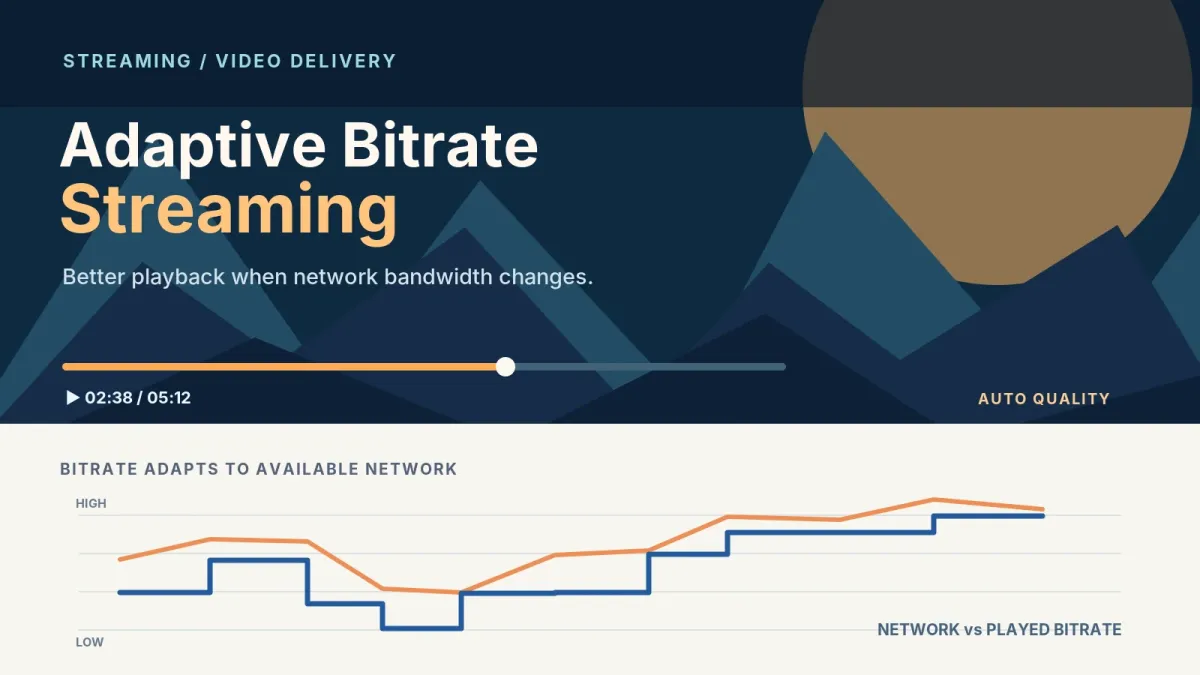

One viewer is on fiber at home, another is on a train moving between cell towers, and both press play on the same title. Send them one file at one quality and one of them loses: either the fiber viewer gets a soft picture or the train passenger watches a spinner. Adaptive bitrate streaming is how a streaming platform serves both of them. The video is prepared at several qualities and cut into small pieces, and the player keeps choosing the next piece that the connection can carry right now.
The idea is simple. The work is in the chain behind it, because the video passes through transcoding, packaging, a CDN and a player before anyone sees it, and a weak link anywhere reaches the viewer as buffering. This guide follows one video through that chain, compares HLS vs DASH, explains where WebRTC fits when delay matters, and lists what tends to break once a real audience arrives.
What is adaptive bitrate streaming?
Adaptive bitrate streaming is a delivery method in which one video is encoded at several bitrates and resolutions, each version is split into short segments, and a playlist or manifest lists them all. The player measures its connection as it plays and requests each next segment from the version it can sustain, moving up or down without stopping.
The HLS specification states the goal plainly. RFC 8216 says HLS "allows a receiver to adapt the bit rate of the media to the current network conditions in order to maintain uninterrupted playback at the best possible quality." Notice who adapts: the receiver. The server prepares the versions and publishes the list, but the switching decisions happen in the player, which is why two players fed the same stream can behave quite differently on a bad connection.
How does a video get from upload to the screen?
Most streaming platforms run some version of the same six steps, whether the video is a recorded file or a live event. Laid out in order, they make up the video streaming architecture you'll be scoping, and each step hands the next one something it can't produce on its own.
- Ingest. An on-demand video arrives as an uploaded file. A live one arrives as a continuous feed from a hardware or software encoder, or from a phone, and the platform has to accept it, check that the sender may publish, and keep reading it for as long as the event runs.
- Transcode. The source is encoded again as several renditions at different bitrates and resolutions. That set is the bitrate ladder, covered in the next section.
- Package. Each rendition is cut into segments, and an index file tells the player what exists: playlists for HLS, a Media Presentation Description for DASH.
- Store and deliver. Segments and index files go to an origin server and reach viewers through a CDN. They're ordinary files fetched over HTTP, so the CDN caches them like any other web content. RFC 8216 describes HLS as offering "compatibility with large-scale HTTP caching infrastructure to support delivery to large audiences," and MPEG says DASH works over "existing available HTTP infrastructure (particularly servers and CDNs, but also proxies, caches, etc.)."
- Play. The player reads the index, starts on one rendition and switches as conditions change. In a web browser this usually happens in a JavaScript player, which the HLS vs DASH section comes back to.
- Control and measure. Around the pipeline sit the systems that decide who may watch: signed URLs and tokenized playback, DRM such as Widevine and FairPlay when a rights holder requires it, and an entitlement check for each user, title and device. Player analytics then show what viewers actually experienced, and that's often the only place a failure becomes visible.
Steps 2 and 3 are often done by one tool, and some teams buy steps 2 to 4 as a single managed service. The steps still exist in that case. They're just run by someone else, and you still need to know which one failed when a video won't play.
What does video transcoding do, and what is a bitrate ladder?
Video transcoding decodes a source file or feed and encodes it again as several renditions, each at its own bitrate and resolution. Ordered from the lightest to the heaviest, those renditions form the bitrate ladder, and adaptive playback is the player picking a rung for each segment.
HLS calls each rung a variant stream. In RFC 8216's words, a variant stream "specifies media encoded at a particular bit rate, in a particular format, and at a particular resolution for media containing video." The server should publish a master playlist that lists each one "to allow clients to switch between encodings dynamically." The RFC keeps the word "renditions" for something else: alternate versions "such as audio produced in different languages or video recorded from different camera angles." Plenty of teams use "rendition" loosely for ladder rungs as well (this article does), so agree on the terms with your vendor or your own engineers early.
The part buyers rarely hear about is alignment. A player can only switch cleanly when the segments on every rung line up in time and each segment can be decoded without the one before it. RFC 8216 uses H.264 as its example, where a segment "SHOULD contain an Instantaneous Decoding Refresh (IDR)," because "frames prior to the first IDR will be downloaded but possibly discarded." The RFC also sets out constraints a server must meet so that clients can switch between variant streams "seamlessly." When the encoder places keyframes differently on each rung, a switch turns into a stall or a visible jump, and the viewer blames their network.
Live and on-demand transcoding differ mainly in when the work happens. An on-demand file is transcoded once after upload and the result is reused for every viewer, so a slow job delays publishing but never playback. A live feed is transcoded in real time, every rung at once, and the encoder has to keep pace with the source; if it falls behind, so does everyone watching. Long recordings can also be split into chunks and encoded in parallel, which shortens the wait before a new upload is playable.
You won't find ladder numbers here, and that's deliberate. The right rungs depend on your content, the codec, and the devices and connections your viewers actually have, so published device guidance should be read against your own audience data before you settle on any.
HLS vs DASH: what's the difference?
HLS and DASH solve the same problem in the same way: both deliver segmented video over plain HTTP and let the player switch between versions. They differ in who defined them, what the index file looks like and which player you'll need.
| HLS | DASH | |
|---|---|---|
| Full name | HTTP Live Streaming | Dynamic Adaptive Streaming over HTTP |
| Defined in | RFC 8216 (2017), an Informational RFC by authors from Apple and MLB Advanced Media, published by the RFC Editor as an Independent Submission; a second edition is in draft | ISO/IEC 23009, a suite of MPEG standards |
| Index file | UTF-8 text playlists: a master playlist listing the variant streams, and a media playlist for each variant | An XML Media Presentation Description, commonly shortened to MPD |
| Segment formats for video | MPEG-2 Transport Streams or fragmented MPEG-4 | "specific provisions for the MPEG-4 file format and MPEG-2 Transport Streams, but can be used with any media format" |
| Browser playback | JavaScript players such as hls.js | JavaScript players such as dash.js, the DASH Industry Forum's reference client |
The table is a comparison built on the sources linked in this article plus common usage (the MPD abbreviation, XML and hls.js), not test data.
Look at the last row. In web browsers both formats commonly play through a JavaScript player built on Media Source Extensions. That W3C API lets JavaScript "generate media streams for playback," and W3C names adaptive streaming among the use cases it supports. On the web, then, the player library you pick and how it handles switching often matter more than the protocol underneath.
DASH also doesn't tie you to a codec. The DASH Industry Forum calls it "codec agnostic" and is candid about the cost: being codec agnostic "is a plus when supporting new codec options, but poses a challenge for encoder or player builders."
So which one should you choose? Start from the list of devices and players you have to support and check which format each one reads. That list decides the question far more often than any difference in picture quality, because the ladder underneath can be the same for both.
WebRTC vs HLS: how much delay can your viewers accept?
Standard HLS and DASH accept some delay in return for scale. A segment has to be encoded, written and listed before a player can fetch it, and players keep a buffer of media in reserve so that one slow download doesn't freeze the picture. WebRTC is built for the opposite case. RFC 8825 defines real-time media as media where generation and display "are intended to occur closely together in time (on the order of no more than hundreds of milliseconds)," which is the range a two-way conversation needs.
That's the trade. Segment-based delivery rides on HTTP caches, so a CDN can serve a very large audience from the same files. WebRTC lets media be "sent to and received from another browser or device implementing the appropriate set of real-time protocols," and those connections don't pass through an ordinary web cache. A broadcast to many people over WebRTC needs media servers that relay the stream to each viewer, and that costs and scales differently from a CDN.
Low-Latency HLS sits between the two. It's defined in the HLS second-edition draft at the IETF, which is still an Internet-Draft and therefore work in progress. The draft says "Low-Latency Mode refers to the combined use of Partial Segments, Blocking Playlist Reload and preload hinting to enable playback at a reduced delay from live." Partial segments divide the newest media "into a larger number of smaller pieces, such as CMAF Chunks," so the player can stay close to the live edge without waiting for a full segment. With blocking playlist reload, the player asks for the next playlist update and the server holds that request until the update exists, instead of the player polling for it. Everything still travels over HTTP, so a CDN can keep caching it, provided it handles those held requests.
The first question we ask on a live project is how much delay your viewers can tolerate, and the answer mostly depends on whether anyone has to talk back. An audience that only watches is well served by HLS or DASH, and low-latency HLS helps when viewers notice the lag (a score that arrives on their phone before the goal reaches the screen). Once viewers need to react in something close to real time, as in an auction, a live class with questions or a call-in show, WebRTC is the better fit. Many products use both: WebRTC for the few people on stage and HLS for the audience watching them.
HLS, DASH, Low-Latency HLS and WebRTC side by side
The four options sort by delay and by how they scale. As with the earlier table, this is a comparison built on the specifications cited above, not measured data.
| Option | Defined in | How media travels | Delay class | Scales through CDN caching | Best fit |
|---|---|---|---|---|---|
| HLS | RFC 8216 (Informational) | Segments and text playlists over HTTP | Segment-based delay | Yes | Large audiences that only watch, live or on demand |
| DASH | ISO/IEC 23009 (MPEG) | Segments and an MPD over HTTP | Segment-based delay | Yes | The same, where your players read DASH |
| Low-Latency HLS | HLS second-edition Internet-Draft | Partial segments, blocking playlist reload and preload hints over HTTP | Reduced delay from live | Yes, if the CDN supports held playlist requests | Live events where viewers notice lag but don't interact |
| WebRTC | W3C WebRTC API; IETF RFC 8825 overview | Real-time protocols between browsers or devices | Interactive, on the order of hundreds of milliseconds | No; needs media servers to relay | Two-way video, small groups, people on stage |
What breaks in production?
A failure often shows up at a different step from the one where it started, and to the viewer they all look alike: the video won't start, or it stops. Here are five common failure points, with where each one begins.
- An encoding job fails quietly. The upload worked, so the title appears in the catalog, but no playable renditions exist and it says "processing" indefinitely. The job needs a failed state that alerts someone, and a way to retry it.
- A splice goes undeclared. An ad break or a source change is spliced into the stream without being declared in the playlist, so the player meets timestamps and encoding settings it didn't expect. RFC 8216 warns that "Unmarked media discontinuities can trigger playback errors," and the viewer sees the same stall as with the alignment problem above.
- The origin takes the load when a live event starts. A large audience joins at once, every CDN edge that hasn't cached the newest segments asks the origin for them, and the origin wasn't sized or shielded for that moment.
- The player chooses badly. A player that moves up too eagerly fills its buffer with media the connection can't sustain, then drops back and stalls. One that's too cautious keeps the picture soft on a good line. Switching rules need tuning for each player and testing on the networks your viewers really use.
- An access check fails and looks like a playback error. An expired signed URL or a denied entitlement often reaches the player as a generic error, so support hears "the video is broken" when the account is the problem.
That's why monitoring starts with what viewers notice: playback errors, buffering and how long a video takes to start. CDN errors and entitlement denials come next, because they explain many of the first three. When we build these platforms, each error is traced from the upload to the playback attempt, so the ops team can see which of four places is at fault: encoding, the CDN, the player or the account.
Build, buy or mix?
You don't have to build all six steps yourself, and most teams don't. A managed video platform or a white-label app covers ingest to playback for a fee and gets you live quickly, but you're limited to the features that vendor ships. Custom work earns its cost when what you sell doesn't fit the vendor's model: subscriptions tied to your own billing, entitlement rules by device or region, or a player that has to live inside an existing product. A mix is common too, with managed transcoding and delivery underneath and your own catalog, entitlements and apps on top.
Playback is also only part of the job. Our faith-based streaming platform case study shows how much sits around the video: the project needed a content management system, localization and community features as well as HD streaming over a CDN. The case study credits translation and language preferences with reaching a global audience, and reports that international viewership went up 50%.
If you're weighing these options for your own service, here's how the streaming platforms we build for media companies fit together, from content and sign-in to entitlements and delivery.
FAQ
Is HLS only for Apple devices?
No. Its authors work at Apple and MLB Advanced Media, and the specification is published openly as RFC 8216, so anyone can read it and build packagers, servers and players for it. The second edition, which adds the low-latency mode, is being worked on in public too, as an Internet-Draft anyone can follow. Browser playback is covered in the HLS vs DASH section above.
What is an MPD file?
It's the DASH index, short for Media Presentation Description, which is the title MPEG gives Part 1 of ISO/IEC 23009. The file describes the whole presentation: the time periods it covers, the groups of interchangeable versions (video, audio, subtitles) and where each version's segments are found, so the player can build its own download plan.
Do we need both HLS and DASH?
Only if your device and player list needs both. Even then you rarely need two pipelines. Both can carry fragmented MP4 media, and MPEG has a part of the standard titled "Delivery of CMAF content with DASH", so one encoded ladder in a shared format can often be described by both an HLS playlist and an MPD.
Why does a live stream sometimes play an old part of the event?
Usually because a cache is serving an old copy of the live playlist. Segments never change once they're written and can be cached for a long time, but a live playlist changes with every new segment. If the CDN keeps the playlist as long as it keeps the segments, players keep asking for media from minutes ago.
Can one platform handle live and on-demand video?
Yes. HLS marks the difference in the playlist itself: in an EVENT playlist "Media Segments can only be added to the end of the Media Playlist," while a VOD playlist "cannot change." MPEG says DASH "supports both on-demand and live streaming." A finished live event can then be published as an on-demand title without encoding it again.
Planning a streaming platform
If your stream buffers at peak times, or you're scoping a new platform and need to choose between HLS, DASH and WebRTC, a discovery call is a sensible first step. We'll go through what you stream, who watches it and on which devices, and how much delay your audience can accept, then show you which parts are worth building and which are better bought.
Buttons: "Book a Technical Discovery Call" → /contact · "Get a Project Estimate" → /project-estimate