
Say a sales rep changes a customer's billing address in the CRM on Monday. On Wednesday, after a call with the customer's accounts team, someone in finance types a different address into the ERP. By Friday the two systems disagree, the next invoice goes wherever the ERP says, and nobody can tell you which address was right, because nobody ever decided whose copy counts.
The connector copied each change exactly as it was configured to. What it lacked was a decision, and that's why ERP CRM integration work starts with ownership and only then gets to the connector. For each record, and for some records each field, you'll settle which system holds the correct copy, which way changes travel and what happens when people edit both sides anyway. If you'd like the basics of how two systems talk over an API first, start with our comparison of API integration types.
What is a system of record?
A system of record is the system whose copy of a record, or of one field in it, counts as correct. Other systems read that copy or keep their own, and when the copies disagree, the system of record wins. Between an ERP and a CRM, that answer changes by record type and sometimes by field.
Salesforce's integration patterns guide assigns that role entity by entity, with cases where "Salesforce is the system of record for certain entities" and others where "The external system is the data master."
You'll also run into "source of truth" and master data management (MDM). MDM is a discipline of its own, with its own category of software, and its job is to build one authoritative record out of many systems. Microsoft's Purview documentation says it "creates a source of truth for your data" and talks about "golden records that represent the authoritative version of master data assets." An ERP and a CRM can start with written ownership rules and leave that machinery for later, because if an MDM platform does arrive, those rules are its first input.
Which system usually owns each record?
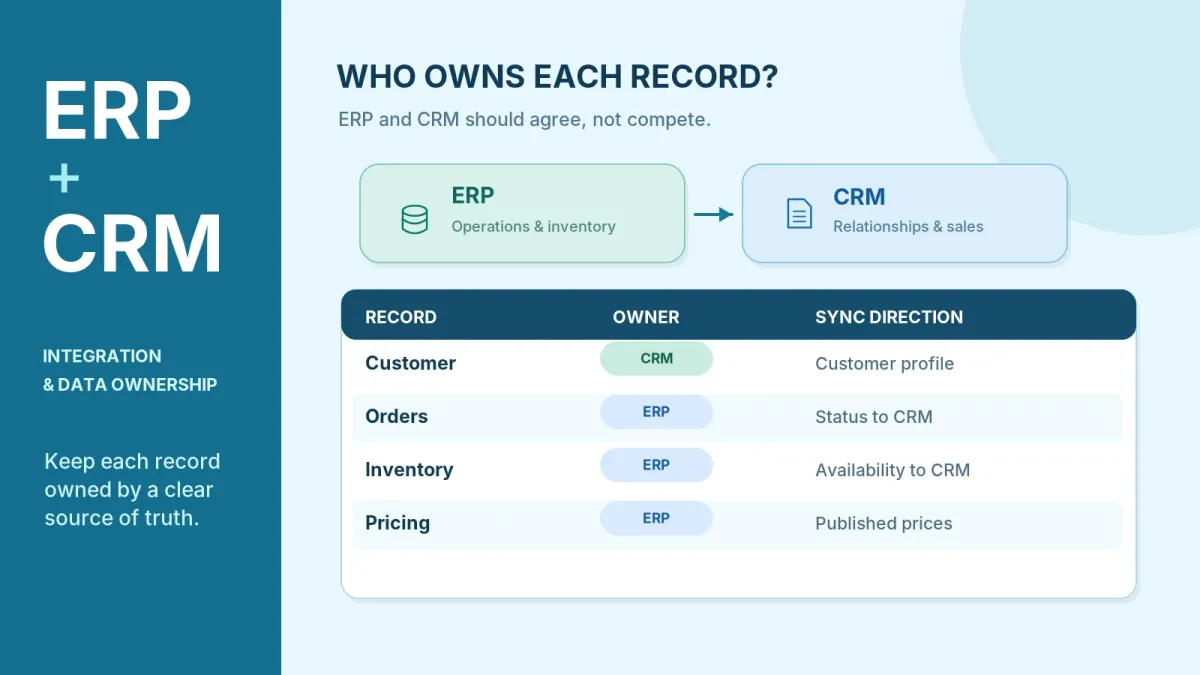
The CRM usually owns the pipeline and the relationship. The ERP owns whatever touches money, stock or fulfilment. The table below gives typical patterns, not universal rules, and what settles each row in your company is where the record is first created and which team has to answer for it when it's wrong.
| Record | Usual owner | Sync direction | Common exception |
|---|---|---|---|
| Lead and opportunity | CRM | None, or one-way to the ERP when the deal closes | Project-based firms may send a won opportunity to the ERP as a new project |
| Customer account and contacts | CRM creates it; ERP owns billing, credit and tax fields | Two-way, with an owner for each field | Accounts that finance opens first (from a signed contract, say) start in the ERP |
| Quote | CRM, or a CPQ tool | One-way to the ERP once accepted | Heavily configured products may be quoted in the ERP |
| Sales order | ERP once booked | ERP to CRM; status is read-only in the CRM | An order management system may own the order before it reaches the ERP |
| Product and item master | ERP | ERP to CRM, one-way | A product information tool may own descriptions and images |
| Price lists and discounts | ERP or a pricing tool | One-way to the CRM | Deal discounts approved in the CRM, inside limits the ERP sets |
| Stock and availability | ERP or WMS | One-way to the CRM, read-only | None worth allowing: stock is never edited in the CRM |
| Invoice, payment and credit status | ERP | One-way to the CRM, read-only | Payment matching against the bank stays on the finance side |
The sales order row surprises people, because the deal closes in the CRM and it feels like the order should live there too. Salesforce's integration patterns include a telecom example in which the order flow starts in Salesforce, "but the back-end ERP system is the data master." That's one worked example, and Salesforce doesn't present it as a rule. The reasoning holds up well beyond telecom, though: once an order is booked, fulfilment and invoicing hang off it, and both of those happen in the ERP. The exception is a stack with an order management system between the store and the ERP. There the order has an owner before it's booked, and omnichannel order management follows its state through each system.
Prices and invoices stay with the ERP for the same reason orders do, because that's where money is settled, and the CRM only reads them. Our ecommerce solutions page says "When the ERP remains your system of record, the store asks the ERP for the price and shows what it returns." A store set up that way keeps no price of its own, so it has nothing that can drift. For invoices the CRM only ever needs the settled status, since matching payments to bank lines is payment reconciliation, and that's finance's job from start to finish.
Should the ERP or the CRM own the customer record?
Usually neither owns all of it. The customer is the record that sales and finance both have good reasons to edit, so it's split by field.
The CRM keeps the relationship side: the account owner, the stage, the contacts, the segment and the notes. Finance needs a different set in the ERP, namely the bill-to address, payment terms, the credit limit, the tax ID and the billing currency. Ship-to addresses are where the argument usually starts. Sales hears about a customer's new warehouse first, but finance needs that address for tax, so give it one owner and make it read-only on the other side. That's a permission or layout setting in each application, and it stops most conflicts before the connector ever sees them.
Then decide where a customer is born. If accounts are created in the CRM when a deal closes, the CRM issues the first ID, the ERP opens its account from that, and each system stores the other's ID. Every later update then finds its match by key. When teams skip this step, the connector often falls back to matching on company name or email, and two spellings of one company become two customers, each with its own credit limit and its own open invoices.
What breaks when stock, price or customer records drift apart?
Sales promises stock that's already gone, a quote goes out at an old price, and one customer turns into two accounts. You'll often hear about it from the customer before anyone inside notices, because the wrong number reaches them first, in a quote, an order confirmation or an invoice.
Stock and price both go wrong because the CRM works from a copy that's only as current as the last sync. A rep sees units as available because the CRM hasn't heard yet that the warehouse already allocated them. Another rep quotes from a CRM price list that missed the last ERP update, and the customer holds you to it. Between a store and a point of sale the same problem plays out field by field, and our guide to ecommerce and POS integration works through those rules.
Name matching isn't the only way to end up with duplicate accounts, because an edit on the side that doesn't own the record can do it too. Two accounts get merged in the CRM, the ERP still holds both, and invoices and payments split across them.
One-way or two-way sync?
Use one-way sync for anything one system owns outright, which covers products, prices, stock and invoices. Two-way sync belongs only on records where each side owns different fields, and even then you set the direction field by field instead of for the whole record.
"Can't we just turn on two-way sync for everything?" Some platforms are built for exactly that. Microsoft calls dual-write "tightly coupled, bidirectional integration between finance and operations apps and Dataverse." Yet even there, the mapping settings let you "customize the synchronization direction (unidirectional or bidirectional)", which is the field-level idea again.
Two-way on everything gives every field two owners, which makes every field a place where the systems can overwrite each other. And every change the connector writes into the ERP looks to the ERP like a fresh update, which it may send straight back. So a two-way connector has to recognise its own writes, or a single edit can bounce between the systems.
A batch can run in both directions, as Salesforce's batch pattern does ("Updates in either direction are done in a batch manner"), and that's fine for contacts, which don't change often. For stock or credit status, though, a batch leaves the CRM only as current as its last run, which is why timing needs its own decision, separate from direction. The simplest case of all is a copy into a data warehouse, which flows one way and is read by analytics without ever writing back.
What happens when both systems change the same record?
The connector keeps one of the two changes by whatever rule it's built with, whether or not you ever chose that rule, and the rule we recommend is owner wins, set field by field. The owning system's value overwrites the other side no matter which change came later, so the result doesn't depend on timing (the paragraph on last write wins below shows why timing is unsafe). It also fits the read-only fields you've already set on the non-owning side.
Teams whose CRM vendor offers an ERP connector often assume it settles this for them. The connector knows how to move a credit limit but not that the credit limit belongs to finance, and if nobody writes that down, you learn which rule it applies when a real invoice goes out wrong.
Last write wins has a place, on low-risk fields such as a phone number or a note. On a price or a credit limit it's risky, because the connector decides what "last" means. If it goes by arrival order, a change delayed by a retry can land after a newer one and overwrite it. If it compares timestamps from the two source systems, an older value can still win when their clocks disagree.
Some money fields will stay editable on both sides, sometimes for good business reasons, and those need a hold-for-review queue. The conflict goes to a named person, and nothing syncs until they decide.
Record locking is the protection many people expect to help here. Salesforce notes that "Standard optimistic record locking occurs on the platform." That protects two people editing the same record inside Salesforce. It doesn't touch a conflict between Salesforce and your ERP.
Field mapping between ERP and CRM
Field mapping says which field in one system matches which field in the other, and how each value converts on the way across, and the IDs are the easy part once you've named where each record is created.
Two picklist values can look alike and mean different things, and a mapping that joins them goes wrong without any error. "Active" on a CRM account usually means sales is working it, while a credit hold in the ERP means finance won't release orders. If the mapping folds the ERP status into the CRM's account status, a blocked customer can still show as active, and a rep quotes and books an order that finance then stops. Bring the credit hold across as a separate read-only field instead, so the rep sees it next to the account status.
When the two systems store a different number of decimal places, currency values get rounded on every sync, and that rounding happens silently too. Microsoft's dual-write has a setting for exactly this: "To prevent data loss during currency transmission between finance and operations apps and the Dataverse, you can extend the number of decimal places in the currency data type of customers engagement apps."
How do you set ownership rules?
Record by record, then field by field, until you have one written ownership sheet that both teams sign off. The order matters, because each step depends on the one before it:
- List every record that both systems touch: customers, contacts, quotes, orders, products, prices, stock, invoices and payments.
- Give each record one owner. Where a record has to be split, name one owner for each shared field.
- Write down where each record is created and which ID links the two copies, and make sure both systems store that ID.
- Set the direction and the timing for each record (real time, on an event, or in a batch).
- Pick a conflict rule for every field that both sides can still change.
- Decide where a rejected record lands and who fixes it. An error that only shows up in a connector log tends to sit there until a customer complains.
- Test the sheet with real edits before go-live. Change the same field on both sides and check that the result is the one the sheet says.
These steps cover much of the same ground as the start of our API integration projects, where the service page says "We map existing connections, identify each system of record, define data contracts, and sequence the move."
Example: a real-estate company with a PMS, CRM, accounting and ERP
Take a hypothetical property company with four systems, where the method stays the same and the sheet just has more rows. The leasing team works leads and prospects in the CRM, since that's where they're created and leasing answers for them. The property management system (PMS) owns leases, units and charges, so once a lease is signed, the CRM stops editing the tenant's financial details and reads them from the PMS. Finance answers for the general ledger, which puts it in accounting, or the ERP. The tenant portal owns nothing; it reads each balance from the system of record and displays it.
Our real estate and proptech page describes the same arrangement: "A common middle path keeps the PMS as the system of record." Rent needs one more step, because a bank credit doesn't always say which charges it pays. The rent ledger and reconciliation case study covers a system that "imports bank credits, proposes which charges they cover, and records the decision a reviewer makes on each one." In the hypothetical company those charges are held in the PMS, so each match is checked against the system of record and the reviewer's decision is stored in one place.
Where this shows up in our case studies
Between an ERP and a CRM there's usually no shared transaction to lean on, so the ownership sheet and the conflict rules have to do the job that a single system can do in its own design. Four of our case studies use that design (each quote below is the technical scope the page describes).
Records with different owners can simply be kept apart, as in manufacturing inventory, where "Financial accounting stays outside the inventory side of the ERP system." Even stock is split this way in multichannel commerce order management, whose inventory "keeps warehouse stock, the reservations taken during checkout and the order allocations as three separate records."
Where related writes belong together, they can be saved in one transaction. Writes that succeed or fail as one unit can't end up disagreeing, and the custom CRM is built on that idea ("Record settings and database changes ride in one transaction, so they commit as a pair or roll back as a pair."). So is retail point of sale, where saving "writes the sale and its lines in one transaction, and the same transaction records the payments, the taxes and the stock movements."
Frequently asked questions
Is the system of record the same as the source of truth?
People often use the two terms for the same idea, but it helps to keep them apart. A system of record is a role one system plays for a given record or field. Source of truth is a claim about the value itself, and an MDM program may build it from several systems of record into one golden record.
Do we need MDM software to integrate ERP and CRM?
Usually not at the start. Two systems with written ownership rules, linked IDs and clear conflict rules can stay in line without an MDM platform. MDM tends to earn its cost when many systems hold overlapping customer or product data and no single one of them can own it.
Can a record have two owners?
A record can, as long as each field has one. When two teams both have a real reason to edit the same value, split it into two fields. Sales enters a requested credit limit in the CRM, finance sets the approved limit in the ERP, and the CRM shows the approved figure beside the request.
Should the CRM ever write to the ERP?
Yes, for what the CRM owns. The usual write is a hand-off: a new customer or an accepted quote goes to the ERP, which checks it and opens its own account or order. Platforms built for two-way sync write far more often. Microsoft's dual-write states that "any data change in Dataverse causes writes to finance and operations apps."
How often should ERP and CRM sync?
As often as a stale value would cost you. For stock and price that can mean not syncing at all, with the CRM asking the ERP whenever a rep needs the number. Microsoft's dual-write scenarios include an "On-demand price engine experience" and the "Ability to look up on-hand inventory availability and details".
Planning an ERP and CRM integration
If your ERP and CRM already disagree, the discovery call is where we look at the records that don't match. We'll go through the records both systems touch and work out with you who should own each one.
Buttons: "Book a Technical Discovery Call" → /contact · "Get a Project Estimate" → /project-estimate