
A field technician is finishing a job in a basement plant room. A driver is out on a rural route with no coverage, and a store associate is counting stock in a back room the Wi-Fi barely reaches. None of them can stop working because the signal stopped, and an offline-first app is built so the app doesn't stop either: it keeps their work on the phone and sends it on when the connection comes back.
Storing data on the phone is the easy part, and the harder decisions come after it: how changes get back to the server, whose edit wins when two people changed the same record, and what the person holding the phone sees in the meantime. This guide works through those decisions for native mobile apps and for web apps, and it takes each rule from the platform's own documentation (Android, Apple, MDN, CouchDB and others).
What is an offline-first app?
An offline-first app can perform "all, or a critical subset of its core functionality without access to the internet," as Android Developers puts it. In practice the app reads from a local database on the device, so screens open straight away, and it syncs changes with the server whenever the connection returns.
Android adds two criteria you can check in any demo. The app should "Remain usable without a reliable network connection" and "Present users with local data immediately instead of waiting for the first network call to complete or fail." The second one is the one teams miss. An app that shows a spinner until a request times out isn't offline-first, because the person in the basement is still waiting on the network. A slow request blocks a screen as surely as a missing one, and Android notes that devices "commonly have periods of spotty or slow network connection." That holds for an offline-first mobile app and for a web app alike.
Does your app need to be offline-first?
Only the screens and actions people have to finish without signal need it, and that's usually a smaller part of the app than the request "make it work offline" suggests. There are three levels, and each one adds work to the level before it.
| Level | What works without signal | What it needs |
|---|---|---|
| Online only | Nothing beyond a clear message that the device is offline | Reliable connection checks and good error states |
| Read-only offline | Looking up data already on the phone: job details, a route, a product list | A local copy of that data and a way to refresh it |
| Full offline for a shift | Creating and editing records: forms, photos, signatures, status changes | A local database, a queue of pending writes, conflict rules and sync states in the UI |
Who needs the third level? People whose work keeps them away from a signal for hours at a time: field technicians, drivers, warehouse workers, clinicians on home visits and store associates. For store associates the reason is the building: "The associate app works offline, since back rooms often have weak Wi-Fi," as our retail page says. When we build offline apps for field and warehouse teams, we define with you which screens and actions must work offline. Each level up adds storage, sync and testing work, so that decision shapes the budget before anyone writes code.
How does offline sync work?
Offline sync reconciles the copy of the data on the phone with the copy on the server once the connection is back. Android's word for it is synchronization: when the app "restores its connectivity, it needs to reconcile the data in its local data source with that in the network data source." For a change the user makes while offline, the flow usually runs like this:
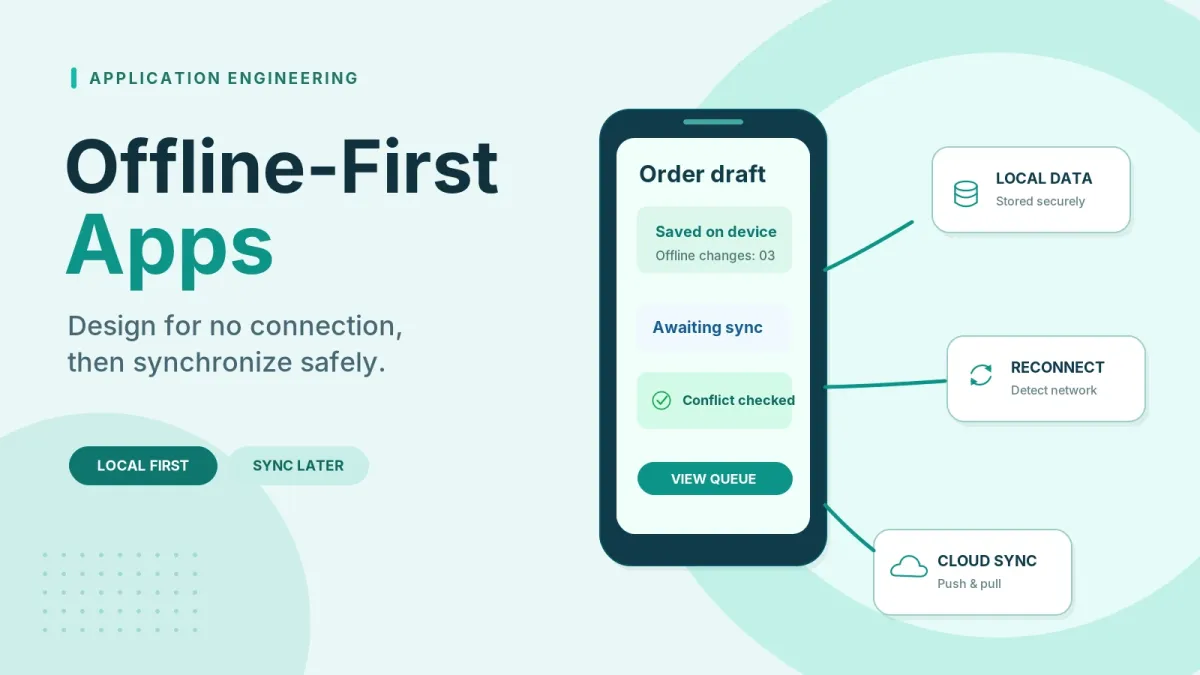
- The app writes the change to the local database first, so the screen updates at once and the user can move on.
- It adds the change to a sync queue and marks it pending.
- It watches for a connection. On the web the browser's online flag is only a hint: MDN says a connection to a local network counts as online "even though the LAN may not have Internet access," and calls the property "inherently unreliable." Native apps meet the same problem on hotel and guest Wi-Fi with a login page, so the real test is whether a request to your own server succeeds.
- Once requests go through, the app drains the queue and retries failed sends with exponential backoff, so a weak connection isn't flooded. On Android, WorkManager runs that work in the background and lets tasks "persist across app restarts and device reboots," which means a phone that restarts halfway through a sync doesn't lose its queue.
- The server checks each change against the version it holds and applies the conflict rule you chose.
- The app writes the server's answer back to the local database and marks the item synced, or marks it failed and shows the user what needs attention.
That covers changes going up. Changes coming down from the server are the other half, and Android compares two ways to handle them. With pull-based sync the app fetches data when a screen needs it, an approach that "works best when the app expects brief to intermediate periods of no network connectivity." With push-based sync the server tells the app when data has changed and the phone keeps its own copy current, so "The app can remain offline indefinitely." But Android lists a cost against it as well: "Versioning data for conflict resolution is nontrivial." A technician who spends a whole shift out of signal usually needs the push model, and so the team building it has to take on that versioning work.
Which writes can wait, and which can't?
It depends on what the write is and what it costs if the write arrives late. Android describes three write strategies, and most apps that work offline use all three, each for different actions.
| Strategy | What Android says | Offline behavior | Field app example (our analysis) |
|---|---|---|---|
| Online-only | For writes "that must happen online in near real time"; Android's example is a bank transfer | Hide or disable the action, or tell the user they're offline | Taking a card payment; booking a time slot another team can also book |
| Queued | Put the write in a queue, then "drain the queue with exponential backoff" when the app is back online; used for "analytics events and logging" | The write waits in the queue until the connection returns | Usage events and diagnostic logs |
| Lazy | "Write to the local data source first, then queue the write"; "the correct choice when the data is critical to the app" | The change shows on screen at once and syncs later, so it can clash with someone else's change | Inspection results, a delivery signature, a photo of a finished job |
The difference between queued and lazy writes is where the change goes first. A queued write only goes into the outbox. A lazy write also lands in the local database, so the user sees it straight away, and that's also why it's the kind that can conflict.
The costly mistakes sit between online-only and lazy, and they go both ways. Make a delivery signature online-only and the driver can't finish the stop. Make a payment lazy and the app shows money as taken when it may never move. Card payments in stores are a case of their own, because some point-of-sale systems have an offline mode with its own limits, and our ecommerce POS integration guide covers offline tills.
What happens when two people edit the same record offline?
Someone has to decide whose change wins before launch, because the sync will apply some rule whether or not anyone chose one. "Last write wins" is the common answer on mobile, but it's one of four.
| Strategy | How it decides | Where it's documented | Trade-off (our analysis) |
|---|---|---|---|
| Last write wins | Keeps the write with the newest timestamp and discards the older one | Android: "For mobile apps, a common approach" | Simple to build; the earlier person's edit disappears without warning |
| Business rules on the server | A rule per record type or field, such as which role's change wins | Our approach (below) | The rules have to be written down and agreed before the build |
| Keep both, resolve later | Picks the same winner on every copy but keeps the losing versions as conflicts | CouchDB | Nothing is lost, but a person or the app has to merge the versions |
| Automatic merge (CRDT) | Changes made on each copy merge automatically by the data type's own rules | crdt.tech | Fits collaborative data; many business records can't be modeled this way |
Business rules are the option we argue for, because they follow how the work is actually divided. We design sync logic around those rules so conflicts are handled on purpose. Our logistics page gives an example. A driver gets a signature where there's no coverage and the phone keeps it, and "In the meantime somebody in the office might have edited that same stop." Whether the office or the driver should win often depends on the field (an address correction from the office, a delivery status from the driver), and we agree that rule with the client in writing before launch.
CouchDB's model is worth reading even if you never use CouchDB, because it shows what "nothing is lost" costs. Its docs follow a user, Alice, whose edits from one device seem to vanish after a sync, although they have "just been hidden away as a conflicting revision." They go on to say that a sensible app "will, at minimum, have to present the conflicting versions to Alice and allow her to create a new version incorporating information from them all." So keeping both versions means building a screen where someone settles them.
Whatever you choose, the server can only detect a conflict if each record carries a version. Android's guidance is that "Conflict resolution often requires versioning," which in practice means a version number or timestamp on every record that can be edited offline, and it's much easier to put into the schema at the start than to add once phones in the field already hold old copies.
Where does the data live on the device?
In a local database on the device, which the app reads from and writes to first. A cache that's cleared when the app closes isn't enough, and Android's guidance is that a repository in an offline-first app "must always have a local data source."
On Android, the guidance names Room or files in local storage. SQLite is the other name you'll meet, and its own documentation describes the job well: it "strives to provide local data storage for individual applications and devices" and "does not compete with client/server databases."
On iOS, Apple's Core Data can be mirrored to CloudKit, so the screens are backed by "a local replica of a CloudKit private database." Read the rest of Apple's page before you plan around it, though, because that private database is "accessible only to the current user." It suits a person's own data across their own devices. It isn't a shared backend for a dispatch office and its drivers, so a business app usually syncs its local store with your own server instead.
The bigger decision is whether you build the sync yourself or use a managed service, and Android describes both. A custom stack means local databases with Room or files, your own network clients and reconciliation jobs scheduled with WorkManager, an approach that "provides maximum control over schemas and custom conflict resolution algorithms." A managed service such as Cloud Firestore handles "disk caching, offline write queuing, and bidirectional sync automatically." That saves building the queue from step 2 and the retries from step 4. But the service brings its own conflict rule. For Firestore, Firebase's page says multiple changes to the same document resolve by last write wins. Before you commit, check whether that rule fits your records, or whether your business rules can be applied on top of it.
Can a web app (PWA) work offline?
Yes, within limits. A progressive web app can open, show data and accept edits with no connection, but it has fewer guarantees than a native app about when the queued changes actually get sent.
Three browser features do the work. A service worker sits between the web app and the network, and MDN says it's intended "to enable the creation of effective offline experiences," which is how a PWA loads its own files and cached responses with no signal. IndexedDB is the local database, "a low-level API for client-side storage of significant amounts of structured data, including files/blobs." And the Background Synchronization API lets the app defer a task so the service worker runs it "once the user has a stable network connection."
That last one is where plans go wrong. MDN marks Background Sync as limited availability and says it's "not Baseline because it does not work in some of the most widely-used browsers." A PWA can't rely on it alone, so the app needs its own retry loop while it's open, and users need to know when closing the tab could leave changes unsent until they return.
If your backend runs CouchDB, PouchDB implements CouchDB's replication "in JavaScript, making it possible to make data from a CouchDB database available in an offline browser application," which saves writing that sync layer yourself. Whether a PWA, a native app or a cross-platform app fits your users is a wider question, and it's the subject of our guide on what matters when building a mobile app.
What should users see while offline?
People should always be able to tell whether their work is saved on the phone, sent to the server, or stuck. When the app is silent about it, people tend to enter the work again or call the office to check, which defeats the purpose. We build mobile apps so users can see whether each change is pending or synchronized, and on screen that usually means five things:
- A connection banner that hints and doesn't block. MDN's advice on the online flag is that "you should not disable features based on the online status, only provide hints when the user may seem offline." Everything that works offline should stay usable.
- A state on each item: pending, synced or failed. A failed item needs a retry button and a reason the user can act on.
- Online-only actions that say so before the user starts, not after a long form. Android suggests a dialog or a Snackbar.
- A screen for conflicts the user has to settle, if your conflict rule ever hands the decision to a person.
- A "last synced" time on data that may be out of date, such as stock levels or a job list that was downloaded at the start of the day.
What about security and lost devices?
Data on the phone leaves with the phone. That's why we cache only the data required on the device and keep everything else on the server. Shared computers raise a similar question for web apps: Firestore's docs say that if a web app "handles sensitive information," you should ask users whether they're on a trusted device before turning on offline persistence. Encryption, remote wipe and session rules are a separate topic.
How do you test an offline-first app?
Test the failures. The happy path, where the signal stays good, is the one case in which the sync logic barely runs. A test plan for an offline-first app should cover at least these cases:
- Airplane mode switched on in the middle of a save.
- The app closed by the system while the queue still holds changes, then reopened.
- Two devices editing the same record offline, then syncing in both orders.
- A long stretch offline (a full shift or more), followed by one large sync.
- A change the server rejects, such as a validation error, to see what the user is told.
- A connection that drops and returns several times during one sync.
The last case finds library defaults that nobody checked. PouchDB's own replication guide warns that with live replication, if the user goes offline, "an error will be thrown and replication will stop," unless you set it to retry, and it calls retry ideal for users "flitting in and out of connectivity, such as on mobile devices." We recommend that a mobile pilot cover offline storage rules and recovery after a failed synchronization, so the cases in the list above get tested before rollout.
Frequently asked questions
Is offline-first the same as caching?
No. A cache sits in front of the server, and the server stays the real answer. In an offline-first app the local data is "the canonical source of truth for the app," and Android says it should be "the exclusive source of any data that higher layers of the app read." Apple's SwiftData docs give the cache version as an example: an app might use SwiftData as a "lightweight caching mechanism" to "provide limited offline functionality."
Does an offline-first app need to write data offline?
Not by Android's definition. "At a minimum, an offline-first app must be able to perform reads without network access," and writing offline isn't required. That makes read-only offline a sensible first release. With no offline edits there's no write queue to build and no conflict rule to agree, which is why read-only offline access costs less.
Is last write wins safe?
It's safe when one person edits a record from one device, such as their own notes or settings. For shared records it isn't, and the reason is how it works: per Android, devices attach timestamps to what they write, and the server "discards any data older than its current state." The older edit is gone, and a device clock set wrong decides which edit counts as older.
What is a CRDT?
A Conflict-free Replicated Data Type. crdt.tech describes it as a data structure whose copies can "always be merged into a consistent state," automatically and "without requiring any special conflict resolution code or user intervention." CRDTs suit shared documents, lists and counters. A record with business meaning, such as a job's status, usually still needs a rule that people agreed.
Does Firebase handle offline sync for us?
For much of it, yes. Per Firebase's docs, Cloud Firestore's offline persistence is on by default on Android and Apple platforms and off by default on the web. When the device reconnects, it syncs local changes, and "For multiple changes to the same document, it's last write wins." If that rule doesn't fit your records, you'll need your own logic on the server.
Planning an offline-first app
If your team has been asked for an app that works without signal, or the current one loses work when the connection drops, a technical discovery call is a sensible first step. We'll go through which screens need to work offline, which conflict rule fits your records, and what your users should see while changes are pending.
Buttons: "Book a Technical Discovery Call" → /contact · "Get a Project Estimate" → /project-estimate